-1.png?width=150&height=38&name=Logo_Original_Dark%20(2)-1.png)
The standard statuses
Fitnet always associate a status to contracts to rank them in terms of progress. Contracts status is successively:
 Open: The whole contract is created in open status. This first stage means that the contract is not yet launched in production; it is under preparation: creating the initial schedule and assignment management, for example. Not being in production, the open contract is unavailable to certain functions such as the entry of time passed, charging of expense sheets or invoicing.
  Launched: The passage of a contract to launched status means it is entering the production phase. Time or expense sheet entry is now available and invoicing can also start.
 Closed: end status for filing contracts
 Cancelled: end status for filing contracts
The transition from one status to another is from the contract record at the general description.
Pre-sales management of a contract via sales statuses
When the contract is open - during the pre-sales stage - it is possible to manage sales statuses.
Sales statuses are used to qualify the commercial progress of the case. The "i" for information is used to configure the statuses:
- in terms of step
- the percentage of progress
- color code
The management of sales statuses is optional: you can enable / disable the function in the "settings" menu.
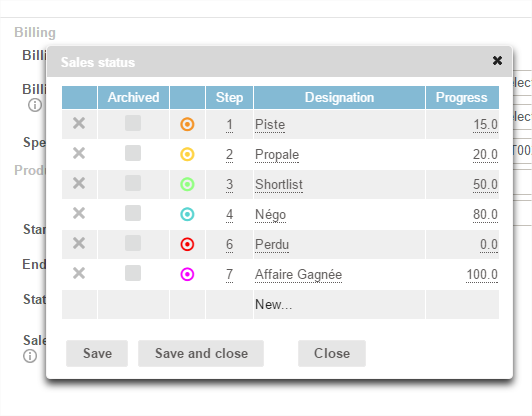
The importance of managing sales statutes is twofold:
- This will prepare contracts, to quickly get their status and sort them
- This will take into account the amount of sales pipeline in reporting