-1.png?width=150&height=38&name=Logo_Original_Dark%20(2)-1.png)
he employee screen contains a specific tab called “Contracts & bonus” which is generated automatically from the addition of an employment contract or bonus from the “Actions” button of the employee module.
Managing employment contracts
Standard management
Employment contracts are managed from the effective date. Amendments are added using the “Add” button:
- The hiring date comes from the employment contract checked in the “Use as date of employment” column.
- Fitnet Manager keeps the history from employment contracts, since the existing is not replaced. This allows you to manage salary changes (Fitnet Manager automatically compares between the new contract and the old contracts to obtain the change in percent).
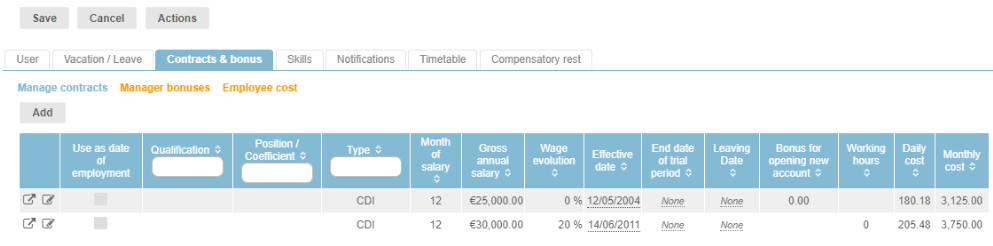
- The “leaving date” field allows you to manage active internal employees. An employee who leaves the company (and is deactivated) must have an exit date in the past (in relation to the current date). You must therefore link an employment contract to an employee page in order to be able to deactivate them.
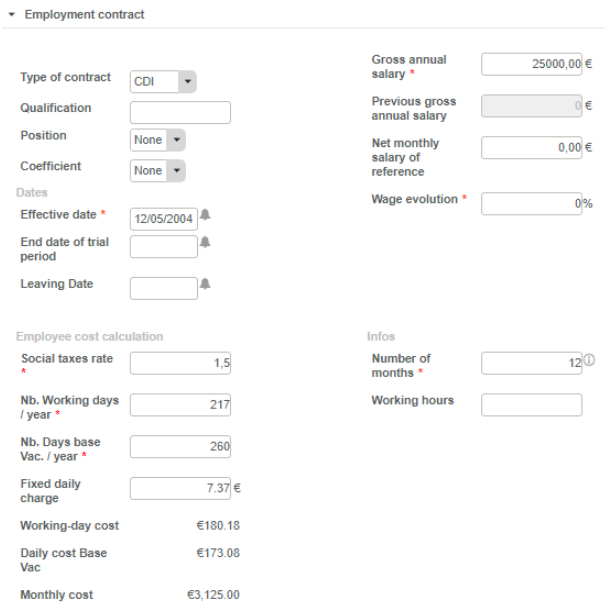
The following parameters define the employment contract:
- The type (CDI, CDD etc.)
- The effective date
- The end date of trial period
- The qualification
- The position
- The coefficient
The employment contract allows you to configure the true employee cost calculation by filling in:
- The gross annual salary
- The social tax rate that corresponds to the employer’s contribution
- The number of working days per year
- The number of Days base Vac. / year = number of working days / year + vacations
- The fixed daily charge
- The workig-day cost and the daily cost base vac., which is used to calculate left days in the Vacation Overview Report.
- The number of months
Fitnet Manager automatically calculates the daily and monthly cost.
- The annual cost is equal to the ((Gross annual salary x Social tax rate) + (Fixed Daily Charge)) x Number of days. It may also include the cost of bonuses within the selected period.
- The monthly cost is equal to the annual cost divided by the number of months.
- The daily cost is equal to the annual cost divided by the number of days per year.
This allows you to also obtain the business profit following the assignment of employees when the “Calculation mode of internal employees' costs on contracts” parameter is set to “Actual costs”.
Vendor Profiles
If an employee is a sales representative, the “Vendors remuneration” option appears in the employment contract. It is therefore possible to specify a Bonus for opening new account, as well as a Commission rate:
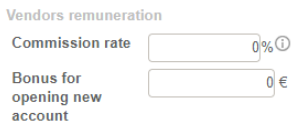
The commission rate is calculated on the margin of a contract. In other words, the vendors know the exact amount of their commission when the contract is closed, by multiplying the margin by their commission rate.