-1.png?width=150&height=38&name=Logo_Original_Dark%20(2)-1.png)
In Fitnet, it is possible to create purchases of 2 different types:
- One-time purchases
- Repeating purchases: to plan a regular purchase
Several fields are mandatory when you want to create a purchase:
- Category description: its title in the solution
- Nature : the list of the kinds of purchase can be configured from the menu of configuration
- Supplier: Fitnet manages the list of suppliers
- The date of purchase: It positions the expense over time
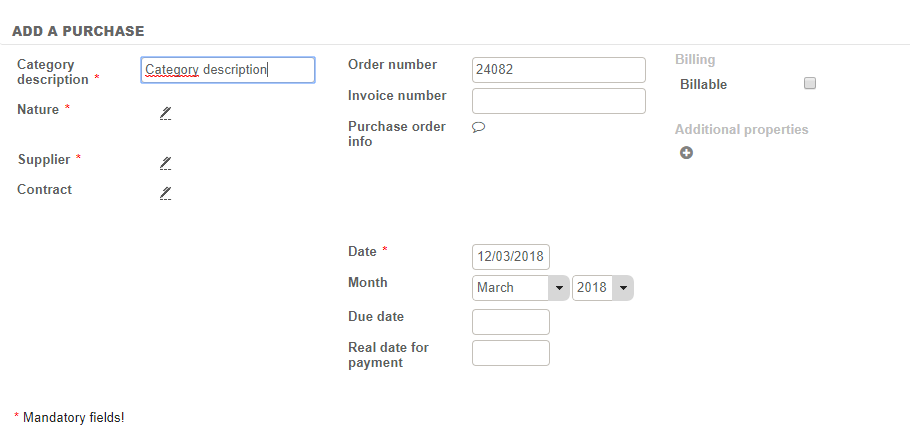
All the other fields are optional and allow to step further in the purchase management:
- Assignment on a contract: the purchase can intervene as a charge on a contract- otherwise it is simply a "structure" purchase.
- Additional option: a purchase assigned to a deal may be "related" to the status of the deal (open / initiated / closed / cancelled). This implies a change in the status of the purchase when the status of the deal changes. For example, a "planned" purchase is turned into "confirmed" automatically when the deal is "initiated". This option is available only after assigning the purchase on a mission.
- Order number
- Invoice number
- Purchase order info
- Attribution month: the month in which the purchase is booked in the system
- Planned settlement date / actual settlement: will allow to track the status of the purchase in the tracking of purchases.
- Additional properties It is possible to add custom properties, which are not proposed on the screen when creating the purchase.
Once the descriptive elements have been recorded, the system allows to record:
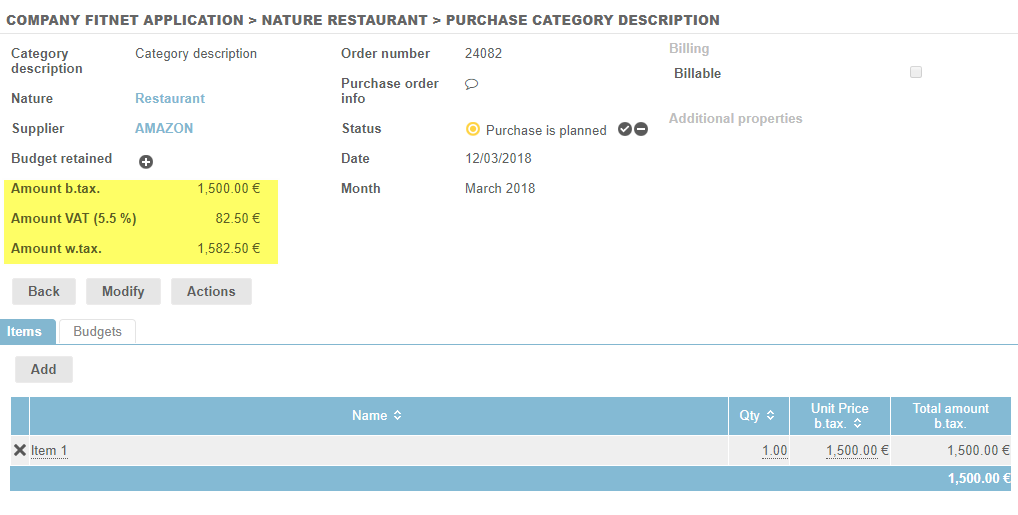
- Items of purchase: the items effectively purchased
- Purchase budget: to record one or more budget proposal (s).
Items of purchase
Simple items
The system requests the compulsory registration of a quantity and a cost.
It is also possible to specify a wording for each item.

The button [record] allows to enter several files in succession without closing the input window.
The amount of the purchase is automatically generated.
Managing the kinds of performances in the items
When you have deals in billing mode “sales”, and when the catalogue of services management for sales-kind deal deliverables is active, you can manage the kinds of performances in the purchase items.
To enable catalog management, go to Settings > Contracts:

When you assign a purchase to sales, and you add an item, the following pop-up opens and allows to fill in the wording, the type of performance (among the editable catalog from deal, or from configuration > catalogue of services), quantity and unit price.
Purchase budget
The Budget function - optional - can be used for different purposes, for example:
- To record the budget allocated to the purchasing department and thus note the positive or negative margin with respect to the actual purchase.
- To record the different proposals received from suppliers in order to compare offers and keep one.
Special cases: repeating purchases
To respond to the issues of regular and predictable expenses Fitnet allows to create repeating purchases.
Unlike a "simple" purchase, when creating a repeating purchase, a "planning" property allows spreading the charge over a given period.
It is therefore necessary to enter a start date and a planning end date.
Figure: by creating a charge distributed monthly, the system will create several deadlines automatically. It should be noted that there is no more definition of details of items purchased but only charges according to the planned deadlines.