-1.png?width=150&height=38&name=Logo_Original_Dark%20(2)-1.png)
Various system behaviors
The key rule to understand is that Fitnet is constantly searching for invoiceable items against scheduled due dates: invoiceable production or expenses continually and automatically feed a proposed invoice generated in open status  as soon as a due date is scheduled (in automatic or manual mode).
No products or invoiceable expenses have ever been left behind in the tool.
Cancelling an invoice proposal
Only invoice proposals, so in open invoice status , can be aborted using the "Actions" button.
They then switch to cancelled status .
.
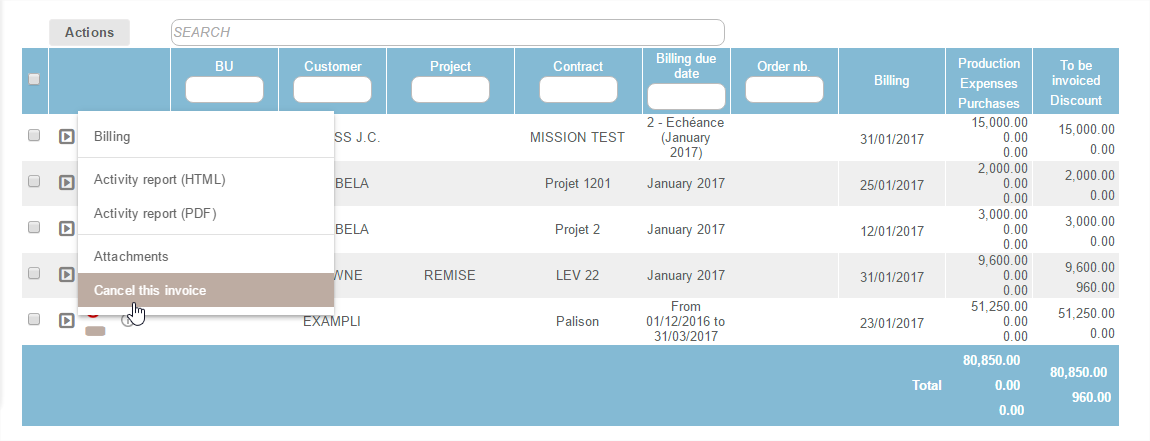
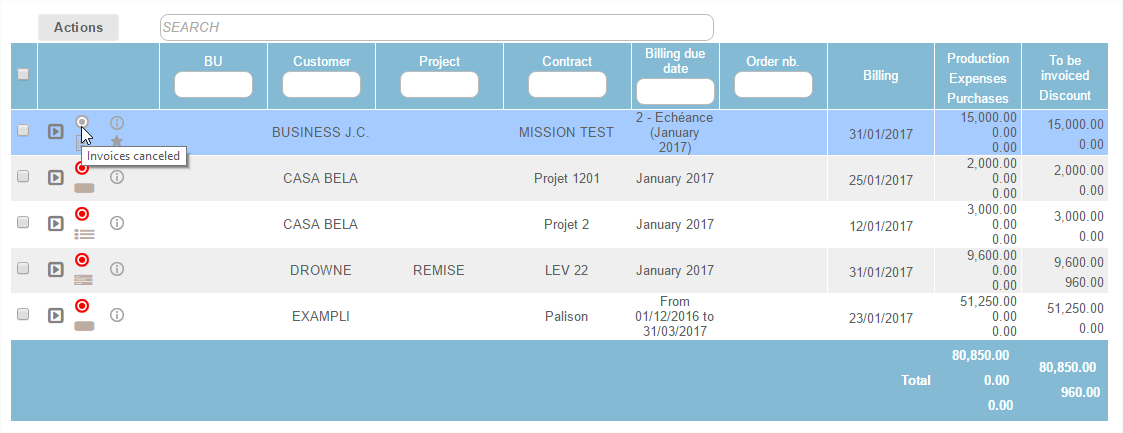
Consequences of a cancelled invoice:
- No new invoice proposal is generated
- The cancelled invoice - the invoiceable amount - is kept in memory and not deleted
- It can be reactivated very simply
- The amount not invoiced will be automatically forwarded to 'Invoicing Remaining ".
Deleting an invoice
All invoices issued can be deleted using the button "Actions" but only when it is in saved status  .
.
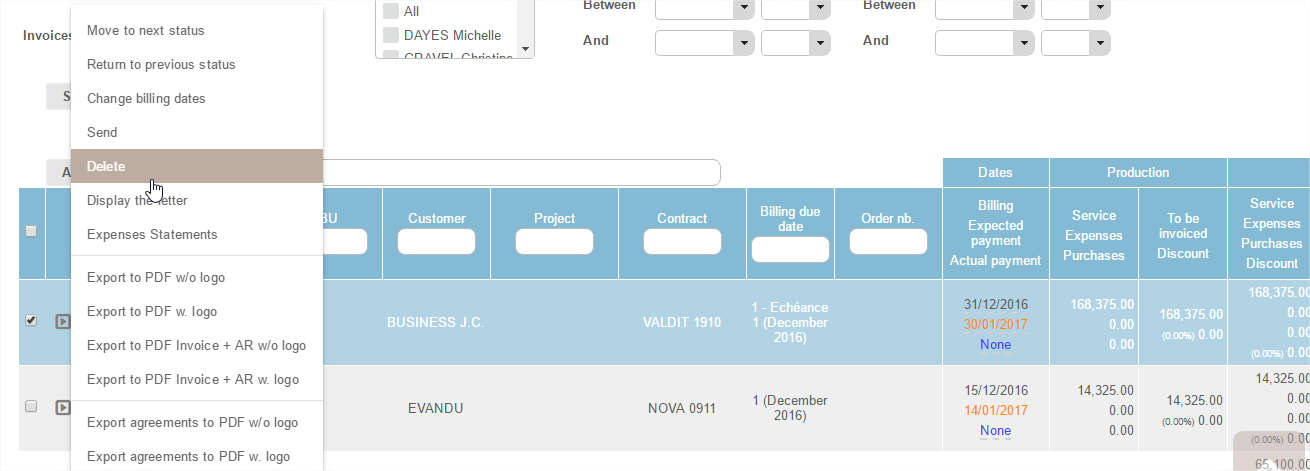
An invoice at sent or settled status
 cannot be directly deleted: it must return to "saved" status.
Consequences for a deleted invoice:
- For the system this means understanding that the invoice never existed
- Fitnet detects the product or expenses to be invoiced and the scheduled due date
- This automatically generates a new invoice proposal in open status

Reminder: to delete a due date you must first delete the related invoice proposal.
Changes in the amount of an invoice proposal 
The invoicing amount is automatically proposed as an item in the invoice proposal but manual changes can be made when saving the invoice:
- Add item
- Delete Item
- Edit Item
In all cases in the end:
- Fitnet automatically checks the amount of the invoice proposal
- Fitnet calculates the difference between the amount of the due date and amount invoiced
- If the amount invoiced is less, a new bill proposal for the remainder will be generated automatically by the tool.
Changes to a saved due date 
Changes to the components in an assignment
Contract/Assignment - despite having been invoiced - can always be changed, in its entirety: assignation of employees, available services, rates, activity reports, etc.
In all contracts:
- When the invoice has already been issued
- No change in the assignment components can alter the saved invoice
For an amendment to be taken into account and for the invoice issued to be updated:
- You must delete the saved invoice
- Fitnet will re-generate it as an invoice proposal,
 taking into account the new settings.
Changing the amount to be invoiced
Although a due date has already been invoiced, it is still possible to change the invoiceable amount by changing: the amount, the activity achieved, the daily rates or even the expenses, for example.
Reminder: no action after saving an invoice will impact or disrupt the already issued invoice - the adjustments, however, are accepted and managed separately.
Consequences if the amount to be invoiced is amended
- Decrease:
- The invoiced amount is higher than the production to be invoiced.
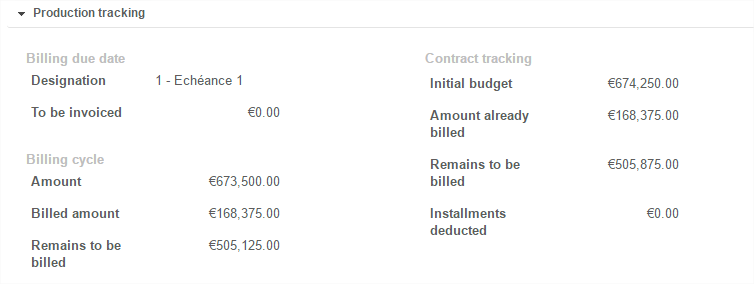
- The information will be found in the "Production Tracking" tab
- There is no impact on the previously issued invoice.
- Increase:
- The invoiced amount is higher than the sum already invoiced.
- This generates an invoice remaining: the system detects this remnant
- A new bill proposal is automatically generated to compensate for the incomplete first due date
- There is no impact on the previously issued invoice
Warning: for a flat-rate price contract in manual billing mode, it is for the user to create a new due date if the amount is adjusted upward. The system automatically proposes to charge the difference when creating.
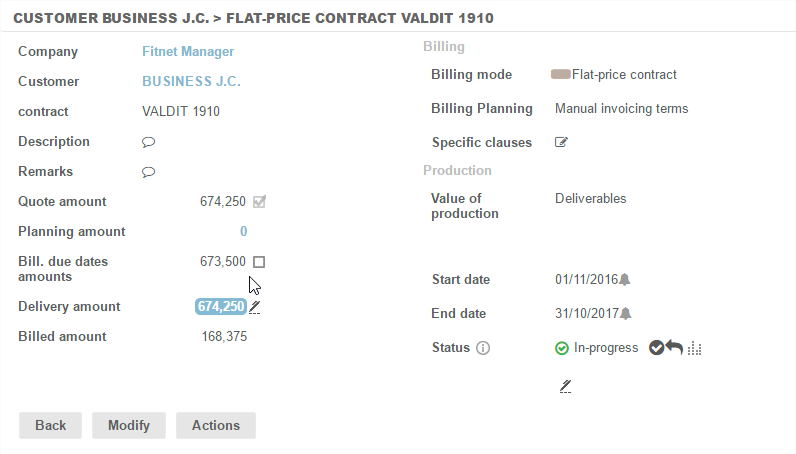
The user finds a loss to invoice at the description of the case where "amount of the case" & "amount due dates" are juxtaposed.
Hourly activities
There is no concept of invoicing due dates for hourly activities (standby, overtime, etc.): invoicing is always monthly.
The 'Pre-invoicing' module proposes:
- Automatically
- End of Month
- from the start date of intervention entered in the standby file, until the date of the end of intervention
- one invoice to issue
The days achieved to be invoiced are aggregated at the level of standby and not at the level of employees assigned to standby.
Although the system automatically proposes the number of days to be invoiced, the proposal can still be modified, deleted or cancelled as seen previously.
Fitnet still monitors the amount of the invoice after each change and calculates the difference to generate a new proposal with the invoicing remaining if necessary.
Production analysis vs Invoicing
On display of each bill - Flat-rate price, Daily price, or Capped Daily price:
- A "Production Tracking" tab is always available
- To carry out invoicing analysis in the light of production
Production tracking comes in multiple columns (3 columns if there is a project):
Billing due Date
This part contains the financial items concerning due date only:
- Initial budget = [number of days initially scheduled x rate] OR amount entered manually
- Invoiceable Product = [number of days actually achieved x rate]
- Amount already invoiced = the amount already invoiced on that due date (excluding fees)
- Remains to be invoiced = the difference between Invoiceable Product & Already Invoiced
Contract Tracking
This part contains the financial items concerning the case:
- Initial budget = Amount entered manually OR by default initial schedule
- Invoiceable Product = Production achieved on the case or Package rate
- Amount already invoiced = Total that has already been invoiced on this case
- Remains to be invoiced = Difference between Invoiceable Product & Already Invoiced
- Forecast remains to be invoiced = difference between the Amount of the forecast schedule & already invoiced (in management)
Project tracking
This part contains the financial items concerning the whole project