-1.png?width=150&height=38&name=Logo_Original_Dark%20(2)-1.png)
You can set variable remuneration, calculated on the gross fixed pay in the employment contract. This feature is inactive by default. Activation can be done from the HR folders settings menu tab > HR Folders > Employment Contract > Activate variable remuneration on employment contract.
Configuration of variable salary schemes
To link a variable salary scheme to an employment contract, you must first create the plans.
Go to Configuration > HR Folders > Variable salary scheme:
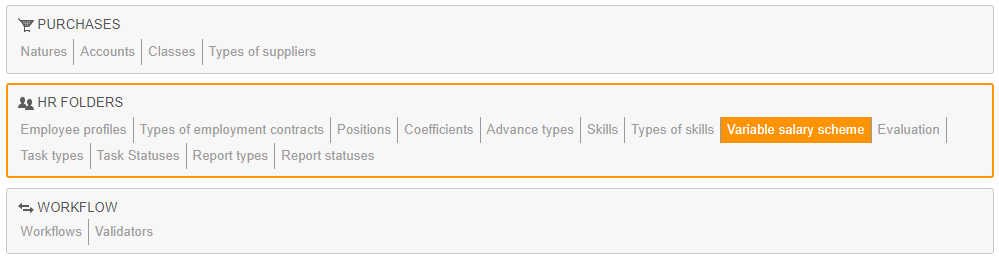
You must first fill in the designation, and then move to the configuration points:
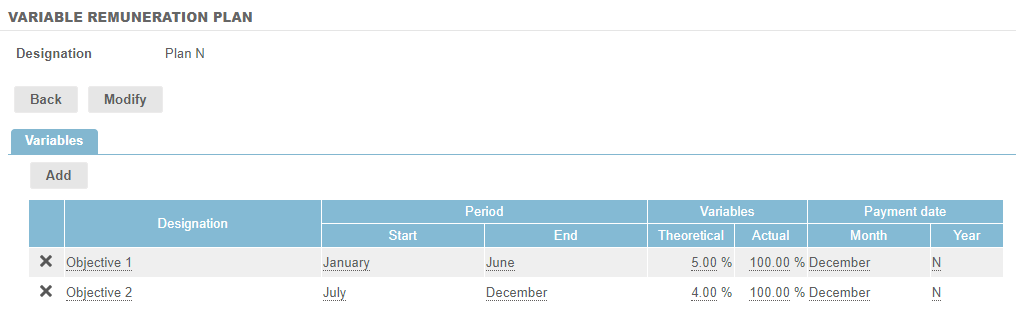
- Several variables can be added. In terms of plan acquisition periods or different objectives that these variables represent.
- Begin date/End date: you must define the variable remuneration's calculation period. Example: you can enter January to June, in which case the system will perform the calculation on that period, the first half of the year. The system takes into account the changes in salary where appropriate.
- Theoretical Variable: you must fill in the percentage of salary on the selected calculation period that will be paid if the objectives are met.
- Actual variable: you must fill in the hypothetic percentage actually earned.
- Payment date: you must fill in the month and the year of payment in relation to the current year.
Linking a variable pay plan to an employment contract
To link a plan to an employment contract, just click on the pen icon when you create or modify one:
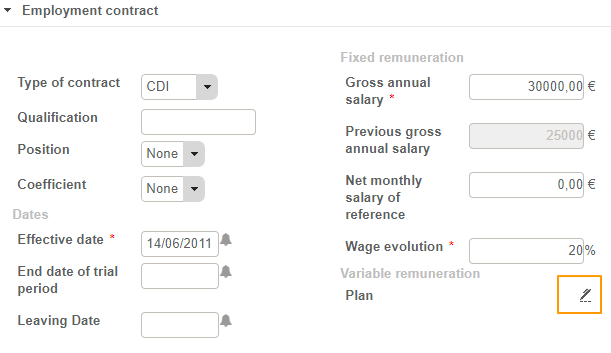
All the plan data can be modified locally (i.e. at the employment contract level).
The variable remuneration is directly visible from the employee screen, at the bottom of the page, in the “Contracts & Bonus” tab:
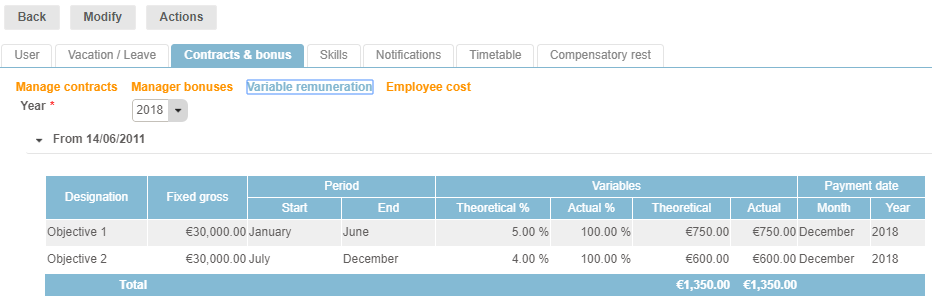
You will find these actual variable remunerations in the Reporting Payroll Information.