-1.png?width=150&height=38&name=Logo_Original_Dark%20(2)-1.png)
To change the settings of the Purchases module, go to Settings > Purchases tab.
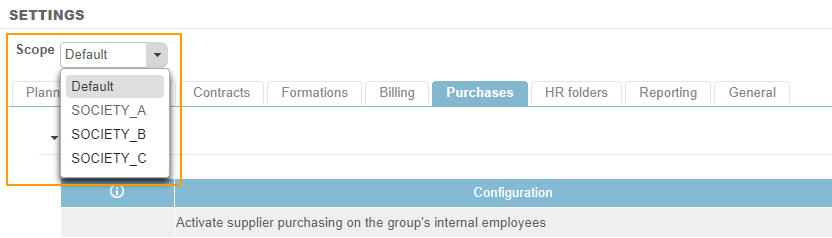
If your environment supports multiple companies and you want to change a setting for one company only: Scope.
Activate purchase order management
Active:
- The “Supplier” property is made available in purchases.
- The “Supplier” property is mandatory when creating any purchase.
- The “Order Number” property is automatically incremented when a purchase is created.
- The “Actions” button appears in purchases and enables you to complete a PDF export of the purchase order and “Add” attachments to the purchase.
Click here for more information about this feature.
Inactive: The purchase order function is turned off.
Turn on disbursements on expenses categorie
Active: This feature enables the creation of a “disbursement” purchase nature. The “Type of chargeback” property with the “Disbursement” and “Purchase” options is made available in Purchase Natures. Click here for more information about this feature.
Inactive: The Disbursement feature is not available in purchase types.
Turn on fee's disbursements on subcontractor's purchase
Active: If charges have been entered by an external employee in a category defined as a “Disbursement” for the subcontractor’s purchase, these will be excluded from the calculation of the deductible VAT amount, and the account number associated with these costs in the accounting entry will be the number associated with the “Disbursement chargeback” contract type. The Active disbursement management for expense categories setting must be turned on beforehand.
Inactive: Disbursement functionalities will be turned off for subcontractor purchases.
Activate the handling of billable expenses on supplier purchases
Active: This allows you to show the “Purchase” box in the Expense category configuration. This allows you to define whether expenses should appear as a subcontractor liability on the purchase form, and therefore whether it appears on the inter-company sales invoice, and if so, the amount to be invoiced or reimbursed.
Inactive: The "Purchase" box is greyed out in the purchase type settings. The default behaviour is applied: expenses appear as a subcontractor liability on the purchase form on the inter-company sales invoice as a reimbursable amount.
Activate payment method management
Active: This allows you to preconfigure a list of payment types for suppliers. This list can be configured in Configuration > Company. In the Supplier screen, the Payment Type property now appears as a drop-down list. Click here for more information about this feature.
Inactive: The payment type, to be completed for Supplier sheets, is a free text field.
Activate Accounting Integration for Purchases
Active: This feature makes it possible to generate accounting entries to feed the Purchase Journal (entries arising from purchases). Click here for more information about this feature.
Inactive: The accounting integration feature is turned off for purchases.
Date of generation of purchase accounting entries
The Activate Accounting Integration for Purchases setting must be activated beforehand.
- Invoice date: The date of purchase will be recorded as the date of the accounting entry.
- Month: The first day of the settlement month will be recorded as the date for the accounting entry. If settlement is due in July 2017, the entry will be dated 1 July 2017.
Start of purchase order numbering
This allows you to start numbering your purchase orders sequentially. If you enter 10 as your purchase order number, the next order number will be 11. The Activate purchase order management feature must be turned on beforehand.
Unbundle the cost of the service in the accounting entry for subcontractor's purchases
Active: In the accounting entries for subcontractor purchases, there will be:
- One line for the Service;
- One line for costs;
- And one line for disbursement expenses.
The Activate Accounting Integration for purchases setting must be activated beforehand.
Inactive: In the accounting entries for subcontractor purchases, there will be a single line with the total amount of the purchase (excluding taxes) against the account number and the purchase type. The total amount excluding taxes does include the amount charge for the service plus any professional costs and the amount of any disbursement/expenses.
Important note
It is important to show this note on any purchase orders. The Activate purchase order management setting must be activated beforehand.
Switch purchase status to "paid" on payment date entry
Active: As soon as the date of the actual payment for the purchase is notified, the status of the purchase automatically changes to “Paid,” unless there is an active workflow for purchases. This feature is only available on the following pages:
- Monitoring purchases
- Payment of service providers
Inactive: Nothing happens when payment against a purchase is notified.