-1.png?width=150&height=38&name=Logo_Original_Dark%20(2)-1.png)
Tip
When you fill in a customer's information, you can determine a default billing address that will automatically be used for all your invoices addressed to that customer.
The default billing address is very useful when you have multiple billing addresses for the same customer, for example in the case of an international customer.
How To Use It
Contracts Module > Customers > Customer's sheet > Adresses tab
You can enter as many addresses as you want by clicking "Add" and filling in the available fields.
When an address is out of date, you have two options :
- Delete it by clicking on the cross at the beginning of the line
- Keep it to maintain a history of the customer's adresses
If you choose to keep the adresses, you will end up with multiple billing addresses for a single customer. In order for the system to know which address to use for invoices, you must mark the correct address as the "Default Billing Address".
To do this, click on the "Greek temple" icon:
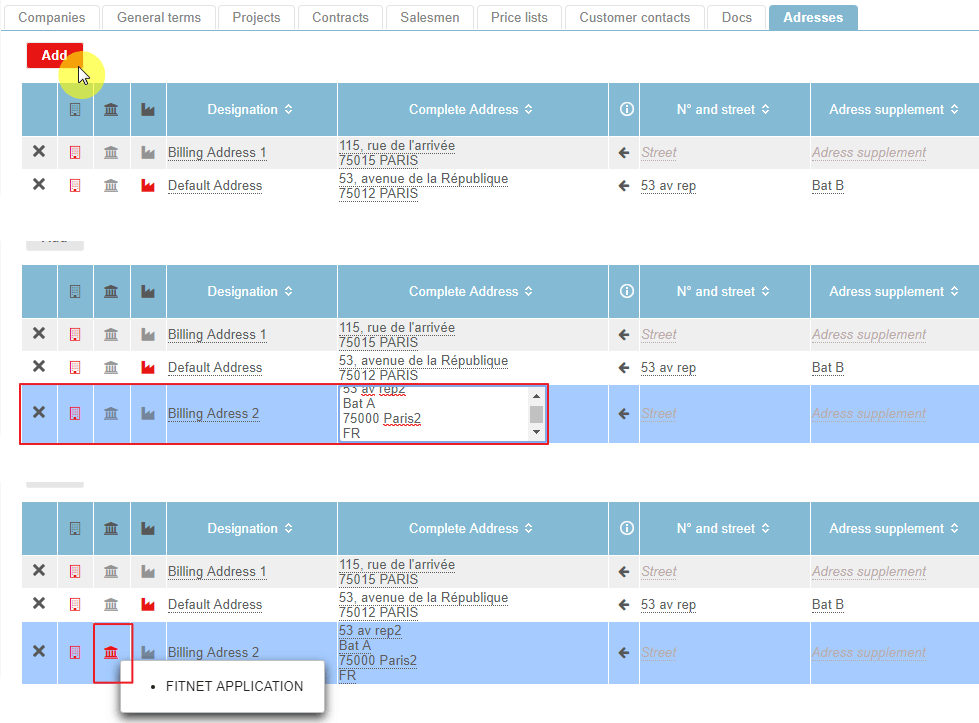
The selected address will be automatically saved as the default billing address.
You will find the default billing address in the header of your invoices:
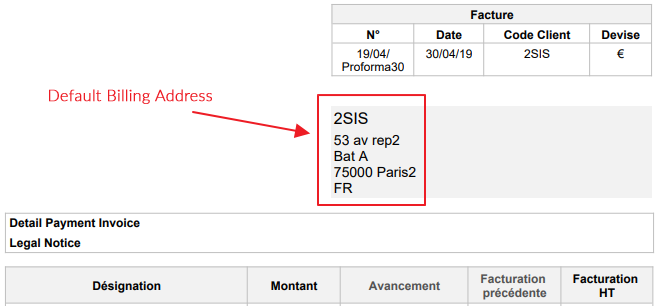
Warning: if you have multiple addresses for the same customer and you do not set a default billing address, no address will appear on the invoice.
Point Of Interest
3 different icons are used to characterize a customer address :
 Companies : allows you to choose which of your companies will use this address.
 Default Billing Address
 Default Address: specifies which customer address is used as the default company address, ie as the delivery address.