-1.png?width=150&height=38&name=Logo_Original_Dark%20(2)-1.png)
We provide a feature that allows you to capture the purchase of external subcontract services.
You must first specify a purchase nature beforehand, which must correspond with the way in which you purchase your external services.
We also manage disbursements linked with external services from within the tool.
This setting is activated when external subcontractors involved in a contract provide notification of expenses and purchases in the “disbursement” category. On the other hand, the purchase of the subcontract services is subject to VAT.
There are two different ways to create a purchase of external services. You can add a subcontract service purchase from the “Purchases” module; this can also be done from the screen dedicated to the contract to which you are assigning the purchase:
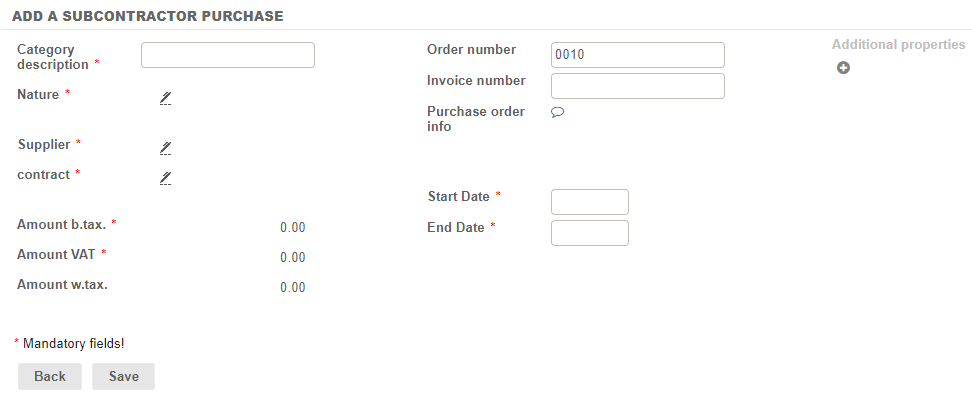
- In the Purchases module > Add a subcontractor purchase:

When a subcontract service purchase is created, some mandatory fields must be completed:
- Category description
- Nature
- Supplier (mandatory if purchase order management is active in your settings)
- The related contract
- Amount b. tax and amount VAT
- Start/end date
Additional fields are also available to be completed (i.e., additional properties can be added):
- Supplier’s order number
- Supplier’s invoice number
- Order details
It is then possible to export the PDF of the purchase order from the “Actions” button (which requires configuration to activate the feature under Settings > Purchases):

Fitnet also allows you to manage external subcontractors as contract employees. These service providers have an entry in your HR folders and can be assigned to particular contracts.
The purchase module, with the Payments of service providers menu allows you to identify where external employees are deployed and ensure that the service is monitored and paid for. This enables the accounting entries to be generated when a contract employee’s assignment is linked a purchase of subcontract services.