-1.png?width=150&height=38&name=Logo_Original_Dark%20(2)-1.png)
Here is the workflow for the target object "Purchase":
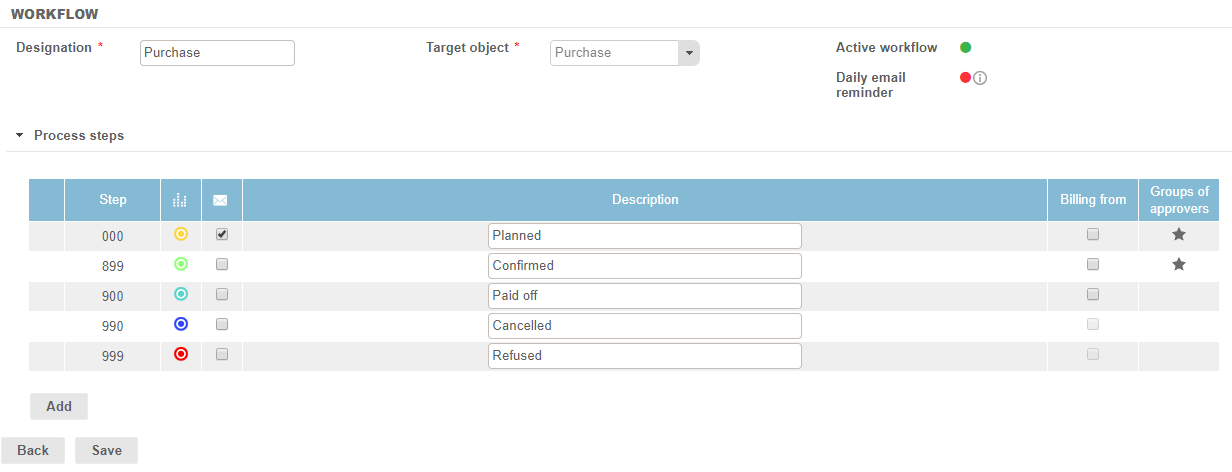
Steps
5 minimum steps are required:
- 2 "submission" steps: only one validation is required to process the request.
- 3 "validation" steps: 3 options are available for the approver to process the requests.
Step 000
Planned Purchase. Has been submitted.
Step 899
Confirmed purchase. The purchase has been validated, it appears on the Project/Contract Dashboard. If the setting "Activate accounting integration for purchases" is active, accounting entries will be generated.
Step 900
Paid off purchase: last step, the request is considered "processed".
Step 990
Cancelled Purchase. The approver has cancelled the purchase, it can be viewed but cannot be modified/restored anymore.
Step 999
Refused purchase. The approver has refused the purchase, it can be viewed but cannot be modified/restored anymore.
Column "Billing From"
The "Billing from" column allows you to decide at which step the billable purchases must be invoiced (i.e., must generate an invoice proposal).