-1.png?width=150&height=38&name=Logo_Original_Dark%20(2)-1.png)
Assign your employees according to their availability: Fitnet shows you the occupancy rate directly from the Contract!
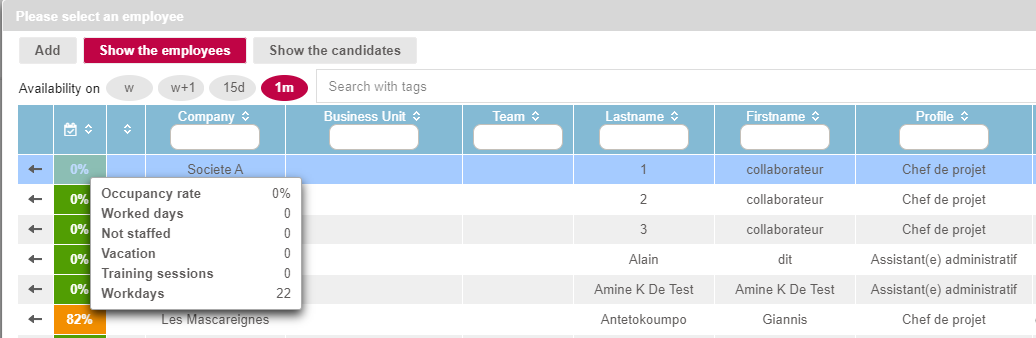
In the employee assignment table, a new data has been added: availability.
Thanks to the color code, according to the occupancy rate, you can identify at a glance which employees are most available to carry out the assignment.
Sort the list in order to select the period you are interested in!
Rolling over your mouse over the occupancy rate you will get all the details of the activities: worked days, not staffed and workdays, vacation, training sessions.
Now use the TAGS search to find the most competent employees!
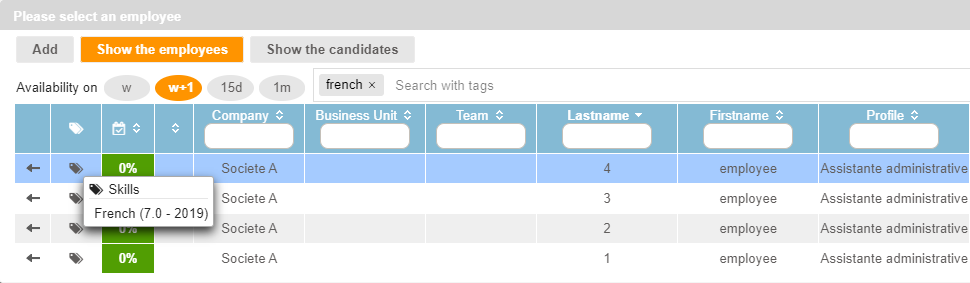
The employee assignment function now includes a new tool: the tag search, i.e. keyword search.
In the new search box, enter one or more tags - for example "developer" "french" "senior" - and the system automatically filters the list of employees to show only those that match.
How does the system performs the search? It is based partly on the Skills module available in the employee's HR folders and in properties such as "profile" for example.
After your search: rollover the TAG column in the HR folders to obtain more details.
Updates
BILLING - EMPLOYEE NAME ON THE DAILY PRICE CONTRACT INVOICE | A new setting allows you to generate automatically the full name of the employee directly on the invoice line.
To activate this option: Settings > Billing > Invoice settings > Consolidation of items for daily price contracts : Employee profile/Type of service.
RECOGNITION OF TURNOVER BY THE COSTS ON INTERNAL CO-CONTRACTOR | This method of calculating production valuation now includes internal co-contractor in production landmark calculations as well as in dashboards.
Cockpit
ADD ADDITIONAL PROPERTIES | Your additional properties are now available across all data sources. You can now query your additional data!
NEW INDICATOR: SETTLEMENT TIME | This indicator is available in the billing data source. The settlement time allows you to know the average payment terms.
NEW TYPES OF GRAPHS | Unique indicator and the bubble chart add to the possibilities of the chart types
Reporting
REPORTING KEY INDICATOR - CORRECTION ON THE AMOUNTS OF PURCHASES IN COSTS | The amounts of purchases in the costs column include recurring purchases.
OVERVIEW OF CONTRACTS : RELIABILIZATION OF FILTERS | Reliability of the "Exclude Closed Contacts" and "Excluding internal subcontractors" filters. Contracts data on which the company subcontracts internally is not displayed.
Corrections
MANAGEMENT OF OVERTIME HOURS | The calculation methods for the management of overtime have been completely thought again. Calculations will be triggered at the closure of each month in a table. The employee will have the choice of getting his overtime paid or having his overtime directly compensating in a rest counter.
CONTRACTS - DELETION ASSIGNEMENTS IMPOSSIBLE | It is no longer possible to delete an assignment if an Activity Completed is entered or an Expense submitted or recorded.
MULTI-CONTRACT AND INTER COMPANY BILLING: ACCOUNTING OF ALL PRODUCT AMOUNTS | For a multi-contracts and inter-company bills, all the produced amounts included in the invoice are included in the monthly Contracts Review reporting. No duplicates in the pre-billing.