-1.png?width=150&height=38&name=Logo_Original_Dark%20(2)-1.png)
Warning: only administrators have access to this configuration.

The natures of purchases menu is available from Configuration. This allows to configure a common behaviour of the application for all purchases related to the same kind.
Access: Configuration> Purchases> Natures
This menu allows to:
- Add, edit or delete nature of purchase
- Export all categories in Excel format
- Show inactive natures
At the top of the page, we have access to the following buttons.

By clicking on the button Add, we can configure a new nature of purchase. We get to the following screen:
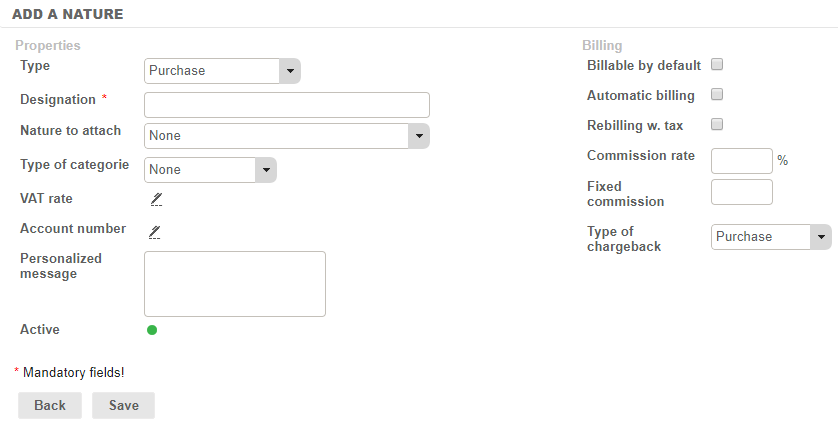
Below, we want to describe each field to optimize the configuration of a nature:
- Designation: the wording of the nature
- Personalized message: to enter a message that will appear on the right of "VAT amount" field when creating a purchase of this nature.
- VAT rate
- Commission rate: profit, in rate, made on the purchase.
- Fixed commission: profit, in fixed amount, made on the purchase.
- Account number: for accounting reconciliation.
- Nature to attach: to build an Expense Categories tree.
- Active or not: allow to disable an obsolete category without deleting data
- Type of category: property inherited from a nature of purchase that can also be a category of expenses.
- Type of chargeback: choice of the kind of re-billing, which will be purchase or disbursements
- Automatic billing: allows the system to put together automatically billable purchases on an invoice proposal.
- Rebilling with tax the re-billing is done price inclusive of taxes, thus the VAT of the invoice will not be applied.
- Billable by default: when creating the expense report the property "billable" will be checked by default. It will however be possible to uncheck it.