-1.png?width=150&height=38&name=Logo_Original_Dark%20(2)-1.png)
You can schedule deliverables on Flat-rate price contracts. This functionality is inactive by default: it must be activated in the settings menu.

Overview and use
Deliverables management on Flat-rate price contracts responds to a production valuation problem.
The principle is to be able to:
- Schedule deliverables i.e. position an amount on a given date
- Adjust the amount of scheduled deliverables on the amount of the service provision
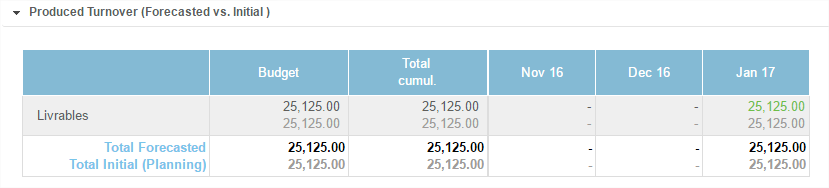
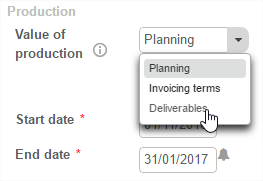
- Value/check production according to deliverables in the case report.
Manual
Adding a deliverable
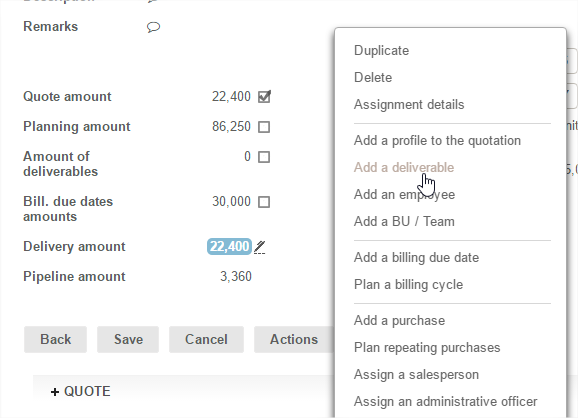
Once the feature is enabled, the creation of deliverables on the Flat-rate price contract is carried out:
From the contract "action" button > "Add a deliverable"
Description of deliverable
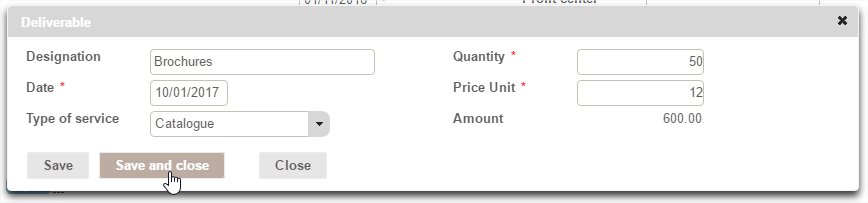
Descriptive elements to fill in when adding a deliverable to a Flat-rate price contract are:
- A designation : an optional name
- The date: this positions the deliverable in the time on contract reports
- Type of service: if catalogue management is active, it is possible to fill in the service rendered, irrespective of whether it is an Article or a Service
- Quantity
- Price Unit
The "save" button saves the deliverable entered, and then empties the form and allows you to directly enter a new deliverable.
The "save and close" button saves the deliverable entered and closes the entry.
Consideration of deliverables in the contract
Once a deliverable has been added a new tab is created by the system in the contract: the "deliverable" tab that lists the scheduled deliverables on the Flat-rate price contract.

A new line entitled "deliverable amount" is created in the description of the contract: it is a cost breakdown tool. It is therefore possible to adjust the Flat-rate price contract sum by the amount of planned deliverables by ticking the validation checkbox.
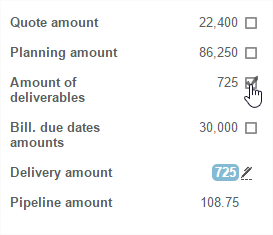
The amount of deliverables is also reflected in the contract guidelines: balance sheets and analyses on the package.