-1.png?width=150&height=38&name=Logo_Original_Dark%20(2)-1.png)
Vehicles can be managed via the Configuration module and from employee files in the HR Folders module.
From the Configuration module
In Configuration > Activities > Vehicles: Manage Vehicles you can configure the list of vehicles available from the company’s fleet.
Two lists are available:
- Active vehicles: available to enter expenses.
- Inactive vehicles: not available to enter expenses.
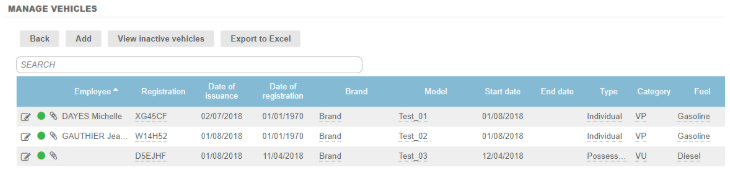
When a vehicle is added, its characteristics must be entered. This information is mainly available on the carte grise, the vehicle’s registration document.
The  alongside each field refers to details on the registration document.
Once a vehicle’s details have been saved, an attachment can be added (such as a copy of the vehicle registration document).
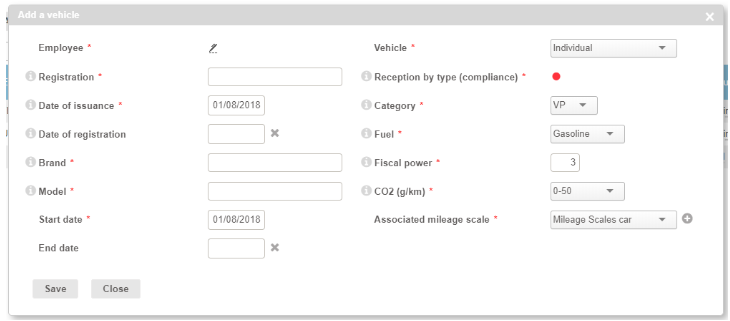
Employee
- This field is mandatory for private vehicles only;
- If no Employee is associated with the vehicle, the vehicle will be available for all employees within the business to enter their mileage expenses;
- If an Employee is associated with the vehicle, the vehicle will be available only for that employee to enter his or her own mileage expenses.
Registration number, Date of issuance, Date of registration, Brand & Model
Refer to the carte grise, the vehicle registration document.
Start/end date
- Allows you to restrict the list of vehicles available to enter Mileage Expenses
- An end date in the past allows a vehicle to be deactivated.
Vehicle
- Individual vehicle
The vehicle belongs to the Employee.
Expenses entered for this vehicle:
- Enable the amount to be reimbursed to be calculated automatically;
- Can be charged to a contract.
- Possessed by the society
The vehicle belongs to the company.
Expenses entered for this vehicle:
- Enable a specific amount to be charged to a contract (a fixed price, for the purposes of Margin and Profitability);
- Are not taken into account in global reporting such as Payable Accounting or the Annual Profit (the “actual” charges for this type of vehicle being the actual costs incurred: depreciation, fuel, insurance, and maintenance);
- No accounting entry is generated.
- Rented by the society
The vehicle is rented by the company.
Expenses entered for this vehicle:
- Enable a specific amount to be charged to a contract (a fixed price, for the purposes of Margin and Profitability);
- Are not taken into account in global reporting such as Payable Accounting or the Annual Profit (the “actual” charges for this type of vehicle being the actual costs incurred: hire charges, fuel, insurance, and maintenance);
- No accounting entry is generated.
This is the same as for a Company-owned vehicle (Possessed by the society) but the distinction is necessary to calculate TVS, the tax on company vehicles.
Reception by type (compliance), Category, Fiscal power, CO2 (g/km)
Refer to the carte grise, the vehicle registration document
Associated mileage scale
Allows reimbursement rates to be calculated automatically
- Mileage Scales (taxes): by default the system suggests the tax set by the appointing authorities every year (depending on the vehicle's number of kilometers and fiscal power output).
- Other scales: scales created and fixed by the user
From the Employee Sheet
A vehicle can be attached directly to an Employee from the employee sheet:
- Using the ACTIONS > Attach a vehicle button [1]
- From the Vehicles tab > ATTACH button (if a vehicle is already attached) [2]
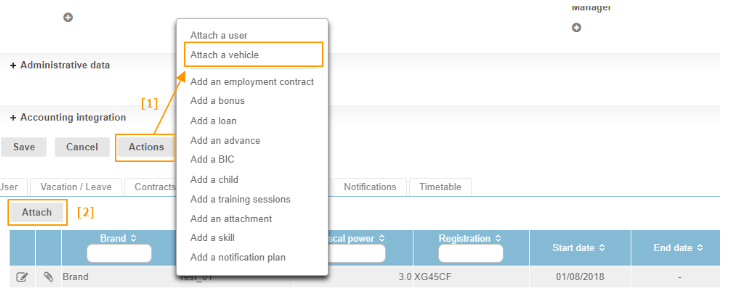
The process is the same as in the Configuration module.