-1.png?width=150&height=38&name=Logo_Original_Dark%20(2)-1.png)
Where in the application can I create a contract?
Contracts are created from the "Contracts" module:
- Either from the Add module > A contract
- Or from the contract database > via the "Add" button at the top of the table
- Or from a project > via the "Action" button - "Add a contract"
- Or from the customer record > via the "Contracts" tab - "Add"
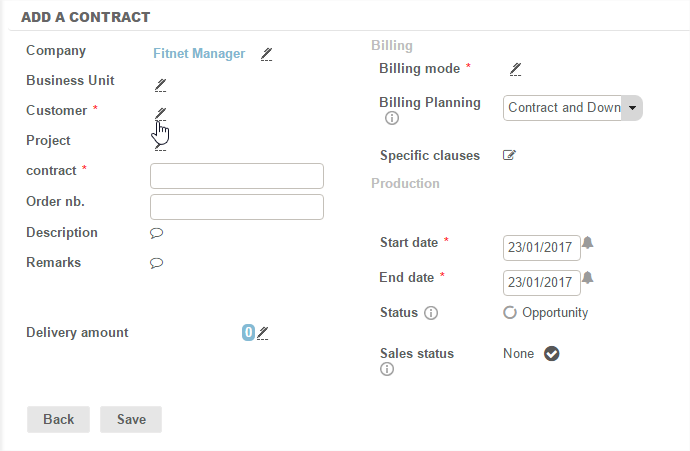
Several description fields can be used to fill in the components of a case.
Required fields
- Company: Fitnet Manager is a multi-company application. If several companies are set, the project is attached by default to the company in which the user is located during creation.
- Customer: You will select a customer from the existing database; or, if this is a new customer, Fitnet offers rapid creation using the "Add" button at the top of the table. A rapid pop-up creation form enables to quickly inform fill in the customer's basic elements.
- Start/end dates: This information is required to be able to classify and retrieve cases - especially in reporting. This field is always editable; so we can fill in provisional dates and edit them later.
- Contract: the name of the contract
- Billing mode: see below under "different types of contracts"
The different types of contracts
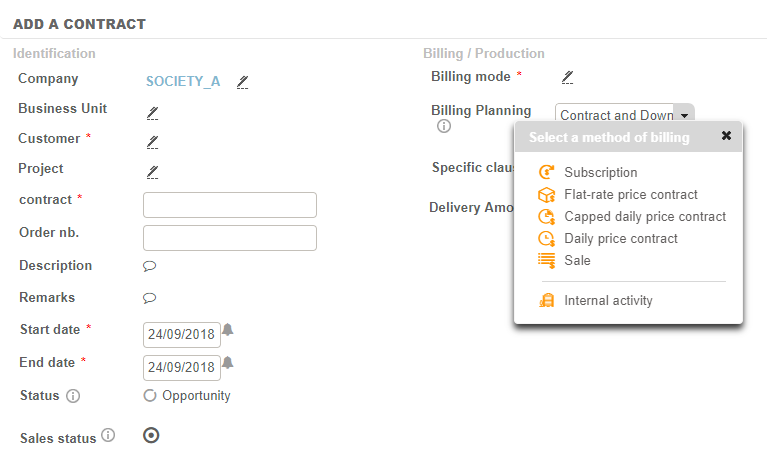
The different types of contracts correspond to the desired invoicing method. The choice of billing method is critical because it will determine the conduct of the contract.
The different billing methods available are:
- Subscription
- Flat-rate price contract
- Capped daily price contract
- Daily price contract
- Sale
- Internal activity
Contract invoicing behaviour according to the type selected
Flat-rate price contract
There are two options to manage flat-rate price contract invoicing:
-The flat-rate price contract is itself the term of the invoicing cycle (Billing planning = Contract and Down Payment ): the system will propose an invoice on the selected due date.
-The flat-rate price contract is not the term of the invoicing cycle (Billing planning = Manual invoicing terms) and it is up to the user to manage due dates - creating them using the Actions button (Billing > Add a billing due date or Add a billing cycle).
Capped daily price contract
Invoicing acts as a daily price contract up to a certain set amount. Exceeding the capped amount stops the "managed" behaviour - the time passed is no longer automatically invoiced.
Daily price contract
Fitnet automatically proposes to invoice time passed (based on activity entered by employees) according to the invoicing plan selected (monthly, quarterly, and half yearly).
Sale
Enables invoicing of deliverables. The assignment of employees on a sale is available (to be enabled in settings) - production achieved by the employee is valued and therefore serves as an axis of analysis in terms of profitability.
The cost generated by employees assigned on a sale is taken into account in the calculation of margin.
Turnover on a sale is only generated by the planned deliverables on the sale. The amount of actual production achieved is available for comparison, in the description and the contract dashboards.
Internal activity
These activities by definition exclude any notion of invoicing. By the nature of Internal Activity contracts, these activities do not enable saving of a daily rate (ADR) for employees. Only costs are recorded in this case. Internal activities are considered in reporting as non-contractual activities.
Optional Fields
- BU (Business Unit): Management of BU is optional. If active it enables you to divide contracts by linking them to a BU.
- Project: contracts can be independent or can be attached to a project. This field is used to link the contract to an existing project or add a new project immediately if it does not exist yet.
- Order number: free field.
- Description: free field that can appear on invoices.
- Remarks : free field that can not appear on invoices.
- Specific clauses: free field that can appear on invoices.
- Number: By default this field is disabled - it has to be activated in the settings. The increment is automatic (the system searches for the last existing number and automatically creates the following number). It is possible to set a prefix by company and set the length of the selected numbering. The increment in numbering is done company by company.
- Profit centre: free field - can be disabled in the settings.