-1.png?width=150&height=38&name=Logo_Original_Dark%20(2)-1.png)
The budget days feature has been developed to allow Fitnet users to estimate their production over a number of days. It makes it possible to sell a service estimated to X days of production regardless of the distribution of these days over time.
The activities (initial / forecasted / completed) of the employees ("Completed Activities" tab and "Timesheet" tab) are compared to the budget days to analyze the progress.
Enabling Budget Days feature
To enable the Budget Days feature, go to the Settings > Contracts > Management policies tab :

Budget Days Management
Fill in the budget days
When assigning an employee to an activity, you can set a budget day, regardless of the cadency.
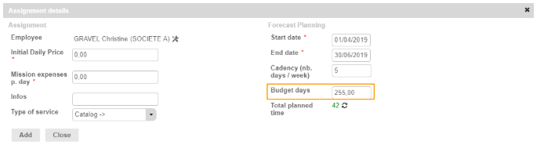
The Total planned time can be a good reference for estimating your budget days since it corresponds to the total number of days defined by the cadency over the period of the contract.
How to read Budget days
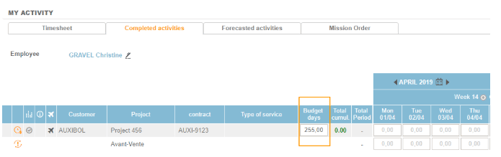
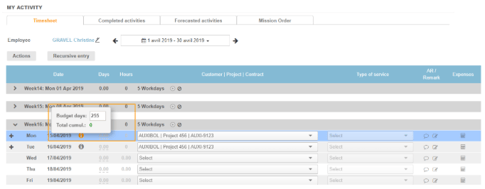
The amount of budget days appears in the various schedules:
- Timesheet (forecasted & completed tabs)
- Timesheet (timesheet tab)
- Contracts (Assignements tab)
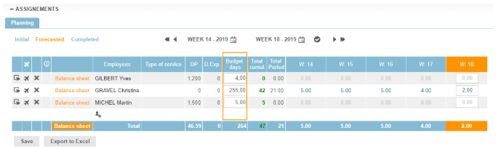
The color code of the Total Cumul. clearly indicates whether the budget days are exceeded or respected. This is a quick and visual way to compare your production and your expenses.
Behavior of day budgets on your business
The functionality does not have the same role on the calculations of the contracts amounts and expenses according to the billing modes.
Flat-rate contract
For flat-rate contracts, the amount of the contract usually corresponds to the initial amount (amount defined when the contract was still an opportunity). The schedule is never taken into account in the calculation of the amount of the service. The idea is to define this amount from a budget days per employee.
The budget day is taken into account for forecasted and completed activities while remaining editable. However, if it is modified, it will not alter the initial amount of the flat-rate contract.
When defining the budget days, you can choose to calculate your charges in 2 different ways:
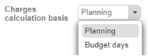
- Planning: your expenses will be calculated on the basis of cumulative totals of the schedule
- Budget Days: the budget days will prevail
Daily price contract
For daily price contracts, the amount of the contract corresponds to a time spent: each day is billed. There is no longer any notion of quantity of days sold. Thus, the schedule will always prevail over the budget days.
The budget days is therefore in this case a rather indicative function of your progress compared to an initial projection:
- If the schedule exceeds the budget days, your production balance is nil
- If the schedule respects the budget days, your production balance is positive