-1.png?width=150&height=38&name=Logo_Original_Dark%20(2)-1.png)
Punctual notifications
You can configure email notifications to be send for approvers every time a new request is submitted.
You can also configure email notifications to inform the employee when his request has been processed.
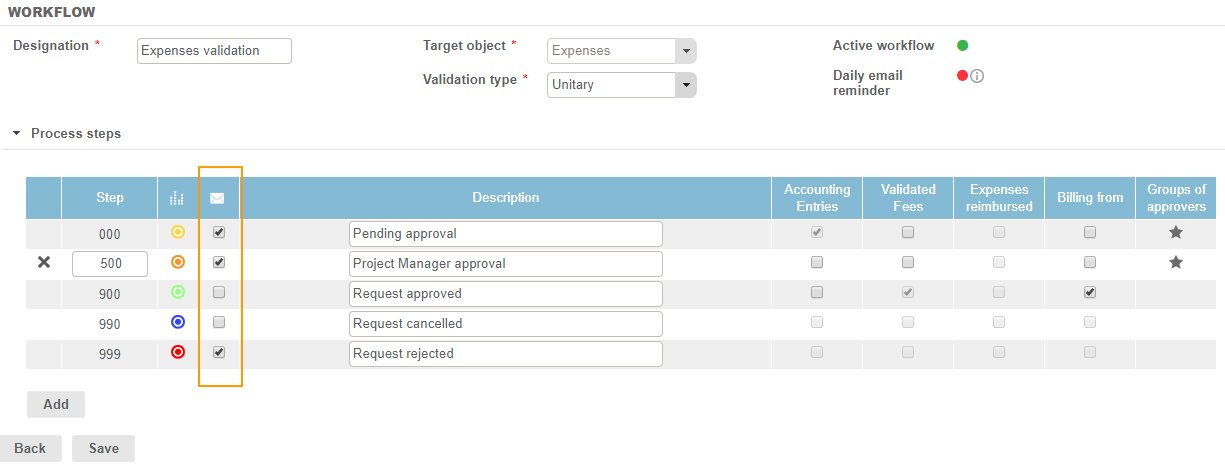
To configure notifications, go to Configuration > Workflow > Workflows, and select the desired target object. The column  allows you to enable (or not) the sending of notifications for every step of the workflow.
If you want the approvers to receive a notification every time a new request has been submitted, you have to check the boxes of this column from step 000 to step 899.
If you want the employees to receive a notification when their request is:
- Validated: check step 900
- Cancelled: check step 990
- Refused: check step 999
Periodic notifications
You can send a daily reminder to all approvers for every workflow: they thus will be able to visualize all of their requests to be processed every morning.
This functionality is active when the icon "Daily Email Reminder" is green-colored. If this icon is red, you just have to click on it to activate the functionality.

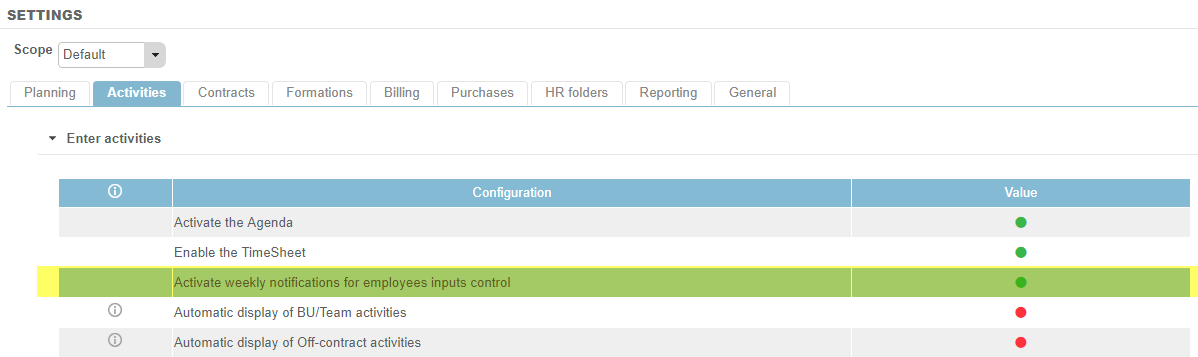
Regarding time recording, you have the option to activate a specific parameter allowing you to send a weekly notification for employees who do not complete their timesheet. This notification will be sent every Monday following the week of the incomplete timesheet. To do this, go to Settings > Activities tab, and activate the setting "Activate weekly notifications for employees inputs control".