-1.png?width=150&height=38&name=Logo_Original_Dark%20(2)-1.png)
Employees’ skills are managed from the “Skills” tab in HR Folders. This menu allows for an annual evaluation of employees’ skills.
To make this tab appear, you need to evaluate an employee’s skill. To do so, click on the Actions > Add a skill button:
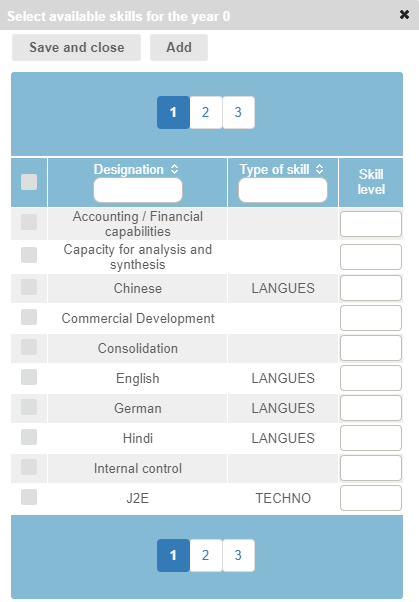
Then just check the skills you wish to evaluate, and update the level of expertise.
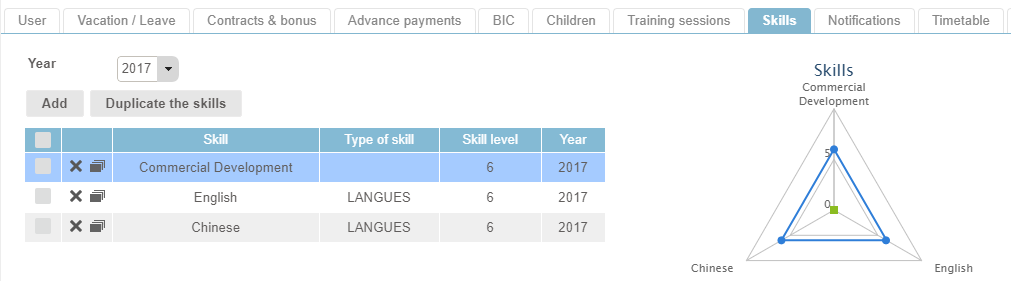
A skills radar chart allows you to see the evolution of an employee’s skills over the course of several years.
To make it easy to input, you can duplicate skills from one year to the next by clicking on the duplicate icon, or by selecting several skills and clicking on the "Duplicate the skills" button:
The list of skills as well as types of skills can all be configured from the Configuration > HR Folders > Skills and Types of Skills menus:

You can activate or deactivate this feature according to company from the Settings > HR Folders.