-1.png?width=150&height=38&name=Logo_Original_Dark%20(2)-1.png)
To modify the settings of the Vacation / Leave module, go to the Settings menu > Activities tab > Leaves.
For a multi-company environment, don't forget to select the scope if you want to modify the settings for only one of the companies.
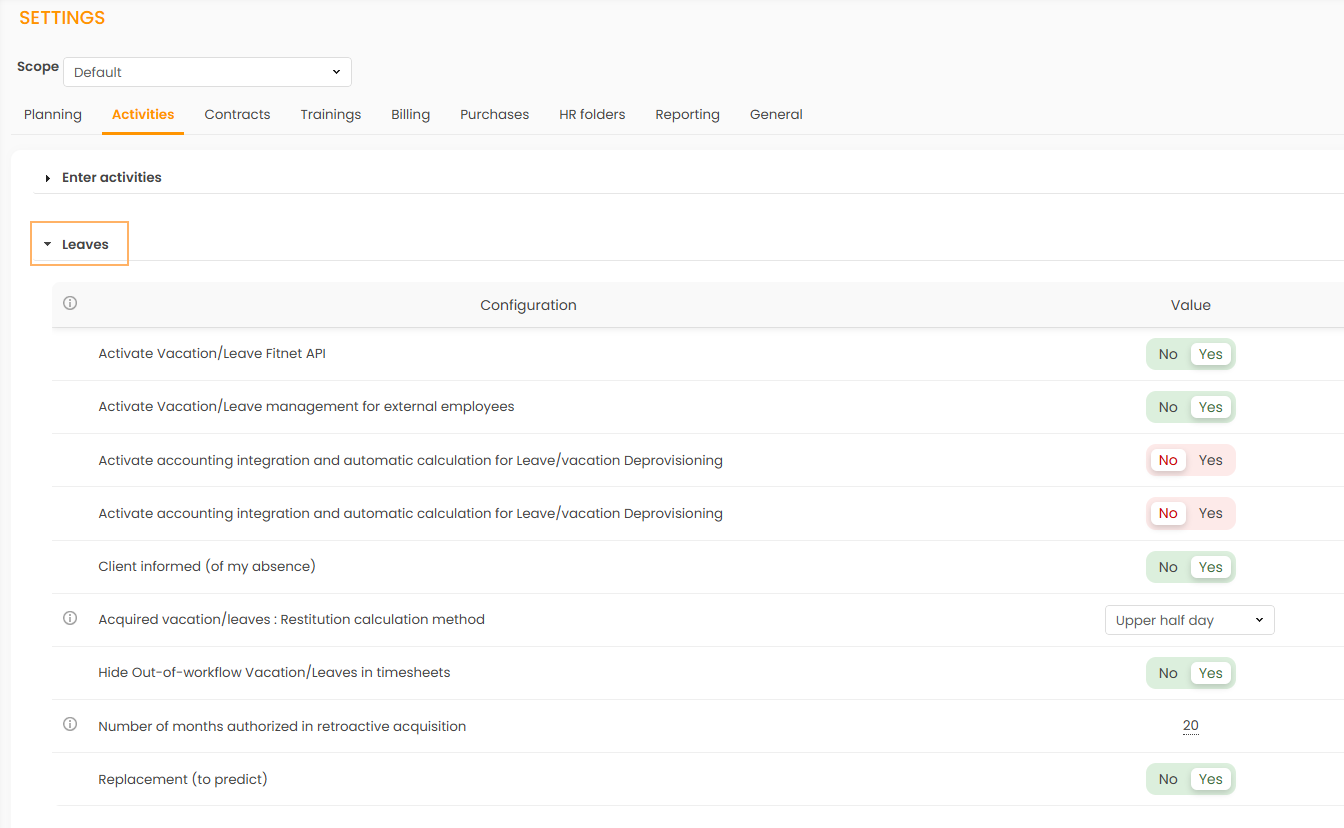
Activate Vacation/Leave Fitnet API
Activated: The Fitnet Leave API is activated. It allows a third-party tool to interact in real time with the Fitnet Manager Vacation/Leave module. You will need to activate the following setting beforehand: Entry type for completed activity only in daily/hourly type.
For more information, click here.
Deactivated: The Fitnet Leave API is deactivated.
Activate Vacation/Leaves management for external employees
Activated: The system allows you to manage vacation/leaves of external employees, similarly to internal employees.
Deactivated: External employees are not displayed in the management of leaves. The system does not manage their leaves.
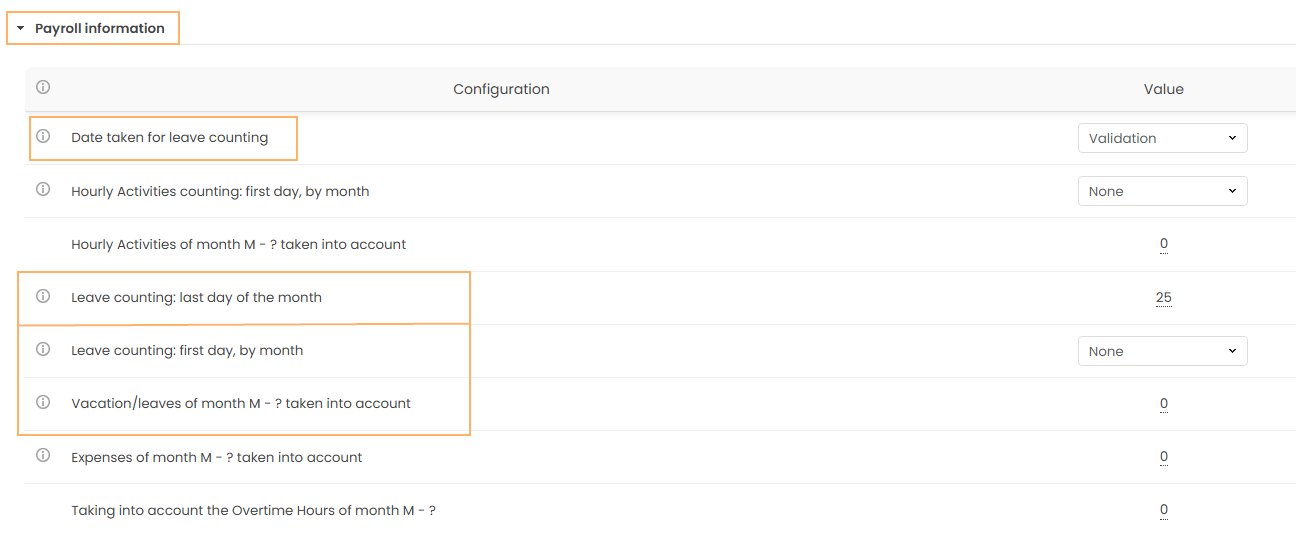
Payroll Information Report of month M : Vacation/leaves of month M - ? taken into account
The value indicates the month of leaves to recover in regard to the analysis month M selected in the Payroll Information. Please note that only the validated leave requests are featured in the Payroll Information.
Client informed (of my absence)
Activated: A checkbox “client informed” is added to the pop up when you take a leave. If the checkbox is ticked, that means that the employee has notified the customer of his absence. More information here.
Deactivated: The "client informed" checkbox is not available.
Acquired vacation/leaves : Restitution calculation method
- Upper half day: The counters are rounded to the upper half day. For example, a counter at 2,3 days will be rounded to 2,5 days.
- Upper day: The counters are rounded to the upper day. For example, a counter at 2,3 days will be rounded to 3 days.
- No round: The counters will not be rounded. For example, a counter at 2,3 days will remain at 2,3 days.
Last day of month taken into account
This value is used in the Payroll Information. It represents the last day of the month to which leaves are taken into account. If this value is set to 21 for example, leaves will be calculated between the 22nd of the previous month and the 21st of the current month.
Please note that this value is taken into account only if the parameter "Payroll Information Report of month M : Vacation/leaves of month M - ? taken into account" is of 0 (default value).
Hide out of workflow Vacation/Leaves in timesheets
Activated: Off-workflow leaves are not displayed in the timesheet.
Deactivated: Off-workflow leaves are displayed in the timesheet.
Number of months authorized in retroactive acquisition
Number of months authorized in retroactive leaves recording, for employee's profiles. With a configured value of "1", employees wil be able to take leaves retroactively to 1 month before the current day (M-1).
Replacement (to predict)
Activated: A "Replacement" checkbox is added to the pop up when you take a leave. More information here.
Deactivated: The "Replacement" checkbox is not available.