-1.png?width=150&height=38&name=Logo_Original_Dark%20(2)-1.png)
Contract employees are managed in the same way within Fitnet as internal resources, with the exception of one or two details.
Creating contract employees
To create an external employee (who will be treated as an external service provider who is assigned to particular contacts), the process is exactly the same as for a resource who is internal to the business. As such, you should go to HR Folders > Employees, then select “Add.”
The only difference when filling out the employee sheet applies at the level of the employee type. As you will see below, this should be set to “External.”
For any other information that can be found on the employee screen, please refer to the HR Folders section.
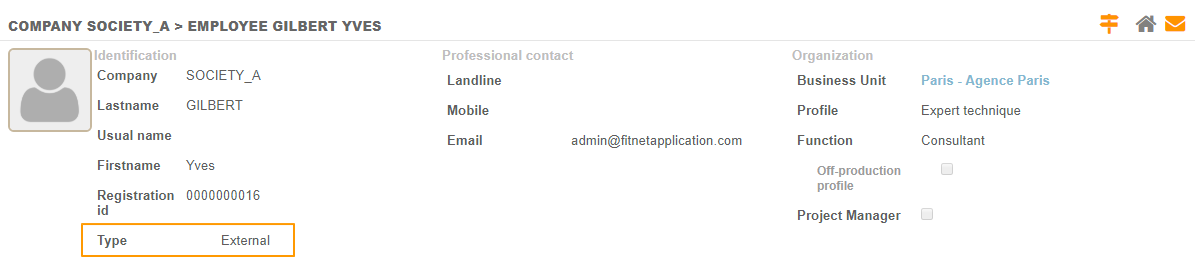
As the external employee is treated as a resource within the application, user access needs to be attached to the employee profile (in the same way as for internal employees).
Assigning external employees
The process for assigning an external employee to a contract is similar to that for an internal employee.
When assigning an external employee, additional fields must be completed in the assignment pop-up.
The additional fields that appear are shown in an orange box and correspond to the payment terms for the subcontractor:
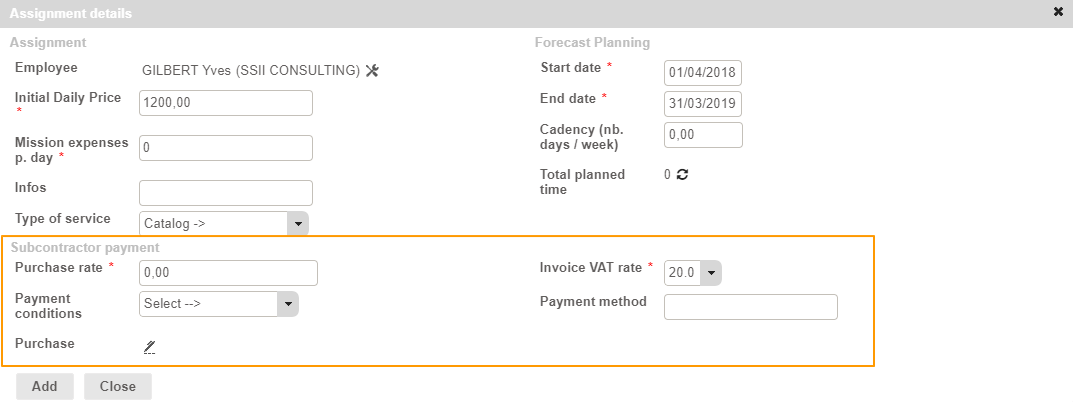
- Purchase rate: the day rate generated by the external service provider for the external employee
- Payment conditions: relates to the payment terms for the supplier linked to this external employee
- Purchase: allows you to select the purchase for the external services by the external employee’s assignment.
- Invoice VAT rate: The VAT rate that is billed by the supplier attached to the external employee;
- Payment method: The method used to pay invoices from the supplier attached to the external employee.
Record time and effort, enter expenses and submit leaves and absences as an external resource
External employees who are assigned to a contract have access to the Activity module on the same basis as internal employees.
Use of the Activity module (filling in timesheets, leave request and assigning costs to contracts) works similarly. For details of the Activity module, go here.