-1.png?width=150&height=38&name=Logo_Original_Dark%20(2)-1.png)
Fitnet can generate the accounting entries to feed the Sales Journal = accounting entries from billing. The Sales Journal is available in the Reporting module > Accounting.
The Sales Journal can:
- be exported manually in .CSV format for integration into a third party accounting application
- be interfaced automatically with a third-party accounting application thanks to the APIs
Enable SALES accounting integration
The "Accounting Integration" module is by default inactive.
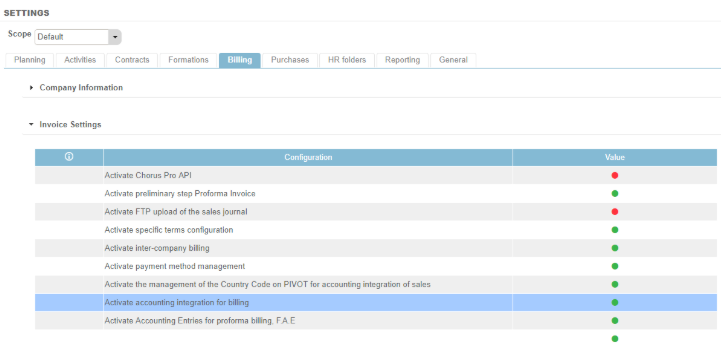
To activate the accounting integration of your SALES, go to Settings > Billing tab > Invoice Settings pane.
Defining the PIVOT for the accounting entry of SALES
Then, it is necessary to define the PIVOT, that is to say what object will be associated with a account of type Product for the breakdown of the accounting entry. By default, the PIVOT is set to the contract type. But you can choose a finer level of detail:
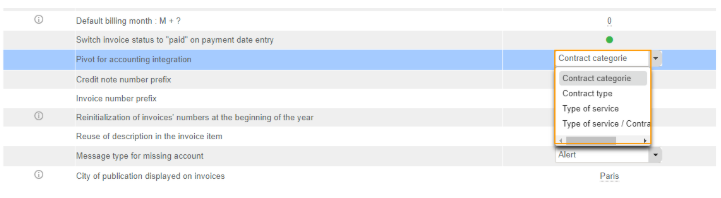
Rule: Whatever the pivot chosen, the Contract Type is the highest hierarchical level. For example, if Fitnet does not find a type of service associated with the sale, the Contract type is used for the breakdown. This is why the Contract Type becomes mandatory to fill in the contract when the accounting integration is activated.
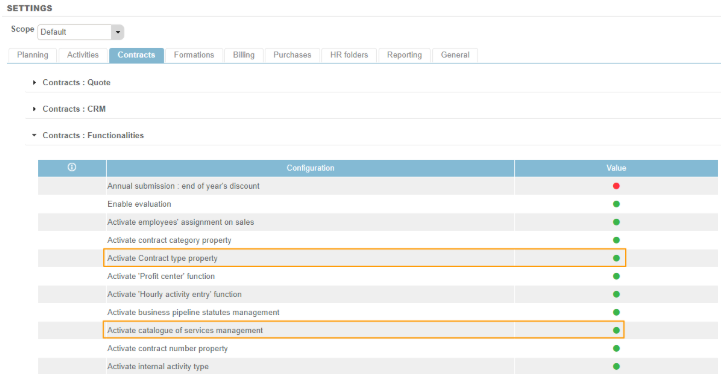
Beforehand you will thus have to activate the 2 following parameters (Settings > Contract tab > Functionalities)