-1.png?width=150&height=38&name=Logo_Original_Dark%20(2)-1.png)
For each purchase (charge) Fitnet generates the following entries:
- Line "b. tax":
- Purchases = Purchase designation
- "Set by the company" Expense = Expense note designation | Contract designation
- VAT line = deductible VAT
- Line "w. tax": Supplier
- Purchase = name of Supplier | Purchase designation (being attached to a Contract does not have any impact)
- "Set by the company" Expense = Name of the Employee | Expense nite designation | Project designation | Contract designation
Example of Accounting entries for a Purchase:

Generating the accounting entry
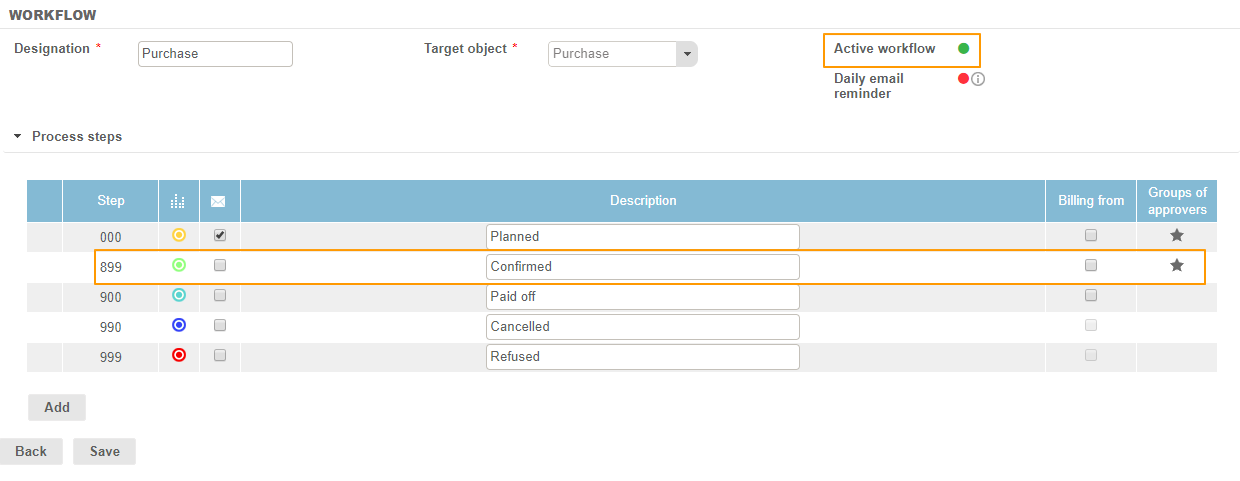
The accounting entry will be generated based on the Purchases Workflow, if it is:
- Inactive: when the invoice of the purchase passes to the status "Sent"
- Actif : when the purchase passes to the step 899 of the workflow
Management Rule
On the same purchase the different Items generate entries on different accounts.
The configuration and the settings make it possible to distinguish the charge accounts attributed to the items of the purchase according to the natures of purchase.