-1.png?width=150&height=38&name=Logo_Original_Dark%20(2)-1.png)
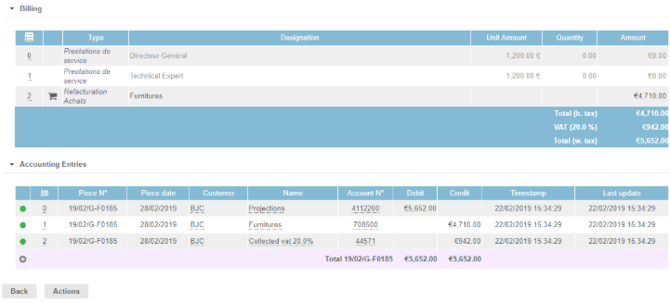
For each sale invoice, Fitnet generates the following accounting entries:
- b.tax : Product = designation of the service (Type defined by the choice of the PIVOT)
- VAT : VAT collected
- w. tax : Customer = Project designation | Contract designation
Example of accounting entries for a sales invoice:
Product Account Management Rules
On an invoice the different items generate rows of entries on different accounts according to the types recorded.
The configuration and the settings allow to distinguish the Accounts Products attributed to the items of the Invoice, as for example:
- Items specific to the delivery of the Contract
- Items specific to billable expenses
- Items specific to billable purchases
- Items assigned to invoice deductions, such as:
- Trade discount
- Withholding tax
- etc.
Generating accounting entries
Accounting entry will be generated when transitioning from Saved status to Sent status
Reminder: "Life Cycle" / Status of an Invoice:
 Open invoice = Invoice to be issued
 Proforma invoice (activatable feature)
- Saved invoice
 Sent invoice
 Paid invoice
 Cancelled invoice