-1.png?width=150&height=38&name=Logo_Original_Dark%20(2)-1.png)
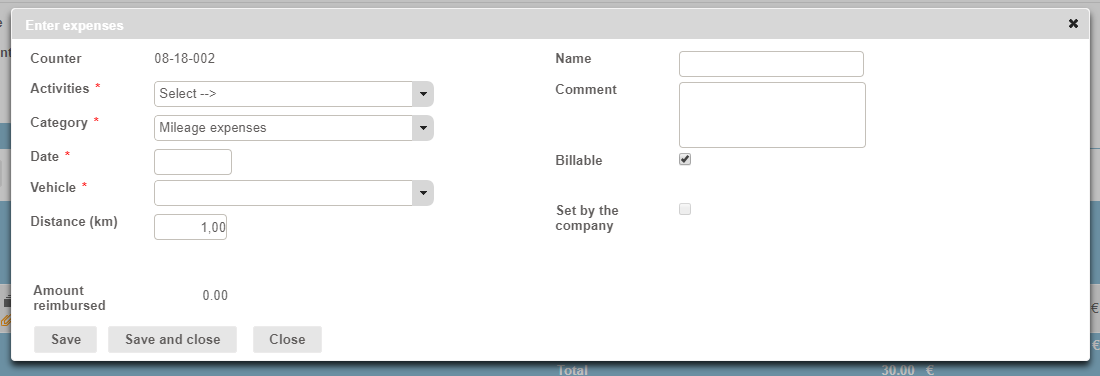
When entering expenses, employees must:
- Select the Activity from the drop-down;
- Select the “Mileage expenses” category;
- Specify a date; if no date is selected, the vehicle list is blank because each vehicle has restricted usage dates with start and end dates
- Select a vehicle: the list of available vehicles is populated:
- Vehicles directly attached to the employee;
- Vehicles that are not attached to an employee but which belong to the same company as the employee;
- Distance (km): the number of kilometres covered;
- A personalized message: as defined in the Configuration
- Amount reimbursed: calculated automatically based on the expense table associated with the vehicle and the distance specified;
- Name: on a case-by-case basis
- Comment: on a case-by-case basis
- Billable: on a case-by-case basis
- Set by the company: automatic, and cannot be changed
- Selected for vehicles owned or hired by the company;
- Clear for private vehicles.
The expense will then follow the same process as all other expenses (depending on the specific issues highlighted previously).