-1.png?width=150&height=38&name=Logo_Original_Dark%20(2)-1.png)
The first stage in candidate management involves creating a list of candidate profiles. There is two different ways to create a candidate profile in Fitnet Manager:
→ Manual way: Manually enter the candidates' data in the system
→ HR Data API: Fitnet will be able to use the data completed by the candidates themselves in an outer form on an external website. The candidates and their data will be directly created in Fitnet Manager. Call your webmasters to create an application page/career page enabling the link to our HR Folders API available in the Configuration > API > HR Folders.
Manual solution to create a candidate's profile
HR Folders Module > Add > “a candidate”
When creating a candidate profile, the only mandatory fields that must be completed are the candidate's name and surname. To enable advanced candidate management, it would be beneficial to complete the following fields:
- Candidate data: vacancy, comments, recruitment status, etc.
- Personal data: contact details, date of birth, etc.
- Studies and training: Bachelor degree, level of study…
- Recruitment: Job position
- Further qualities: of your choice.
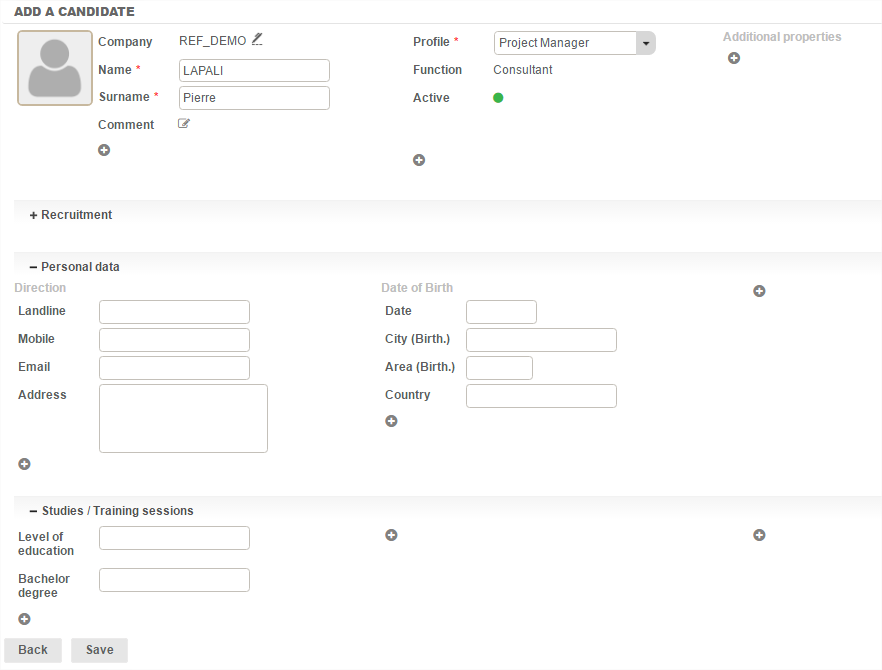
After these data have been created, you may add attachments, skills and an evaluation plan. We address these points in further detail later in the documentation.
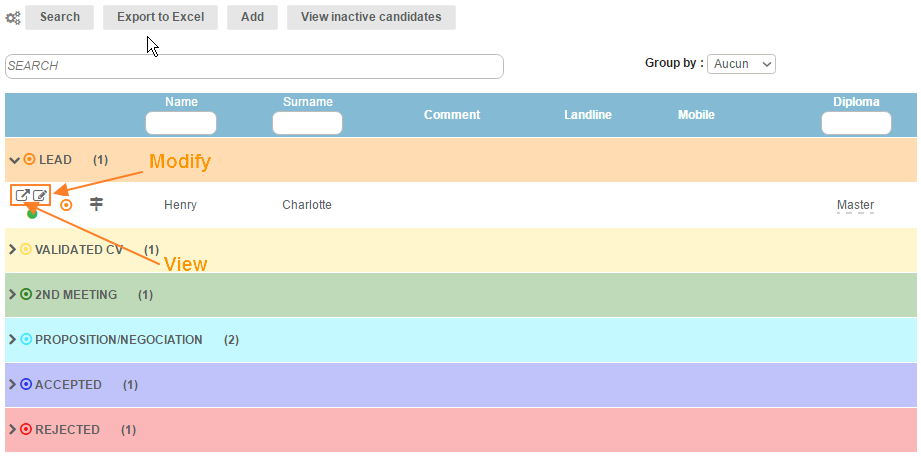
The candidate profile created appear in the "manage candidate profiles" tab, and can be edited or displayed by clicking on the corresponding icons to the left of the table.