-1.png?width=150&height=38&name=Logo_Original_Dark%20(2)-1.png)
General Configuration
Types of leaves can be configured globally, that is for all employees, in the Configuration menu > Activities > Types of leaves.
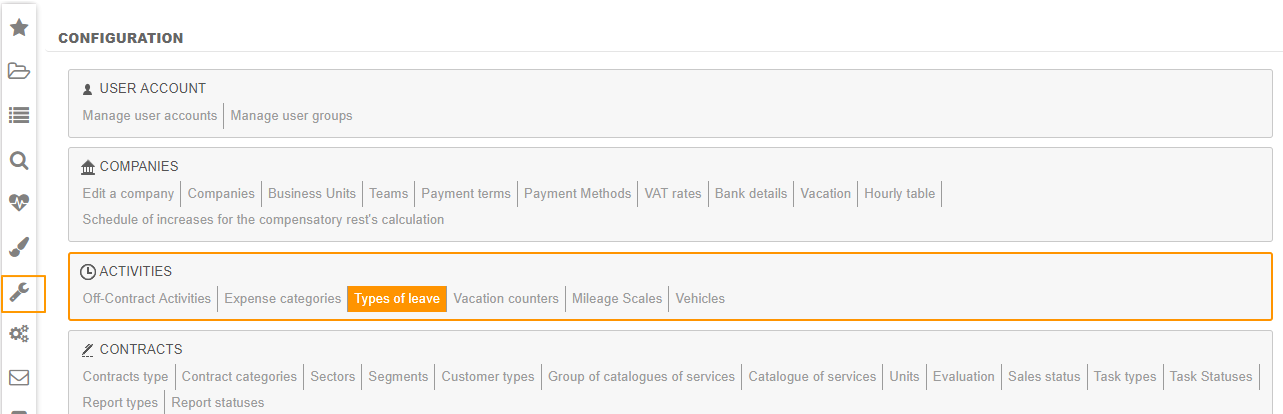
You can create / modify / delete types of leaves.
The configuration of types of leaves requires you to complete the following information:
- Abbreviation : it allows you to interface Fitnet with a third-party tool;
- Attribution
- Updatable: The employee can select this type of leave to submit a vacation request
- Readable: The employee can view the type of leave, but he can't use it to submit a vacation request
- Deactivated: The type of leave is invisible
- Start date: 1st month of the calculation period for this type of leave
- End date: Last month of the calculation period for this type of leave
- Calcul type (see details below)
- Workdays: vacations are calculated according to workdays, i.e. 5 days/week
- Working days: vacations are calculated according to working days, i.e. 6 days/week
- Max days / year: Maximal number of days an employee can cumulate in the period.
- Increment, acquired number of days and frequency: Number of acquired days for this type of leave per period (month or year)
- Max taken / month: Maximum number of days an employee can take for this type of leave (per month)
- Transfer "left days" onto another type of leave: at the end of the period, days of leave not taken are transferred to another type of leave.
- Rounding rule on Recovery of left days
- Round up to the next integer: The number of left days is rounded up to the next integer.
- No rounding: The number of left days is not rounded up.
- Suspension of other absence type(s): When an employee has taken a day from this type of leave, you can select another type of leave that will not increment during his absence.
- To exceed the balance of leaves
- Allowed: If the counter is of 0, you can still take days on this type of leave.
- Alert: If the counter is of 0, an alert message informs you that you are taking days on an empty counter. You must then certify you have read the message to go on and save your leave request.
- Blocked: You can't make a leave request if the counter is of 0.
- Recovery of left days: Activation or not of recovery of left days
- Contract activity: Consider or not this type of leave as a contract activity when calculating the staff activity rate in the Annual Staffing Report.
- Auto. validation: Activate or not the automatic validation of this type of leave.
- Furlough leave: Defines whether this type of leave is a furlough leave or not.
- When activated : you can define the employment period corresponding to this type of leave (months or years).
- Available holidays valuation: Activate or not left days valuation in the Vacation Overview report
- Synchronising id: ID allowing you to interface Fitnet with a third-party tool.
Local Configuration
The employee's sheet includes a "Vacation/Leave" tab.
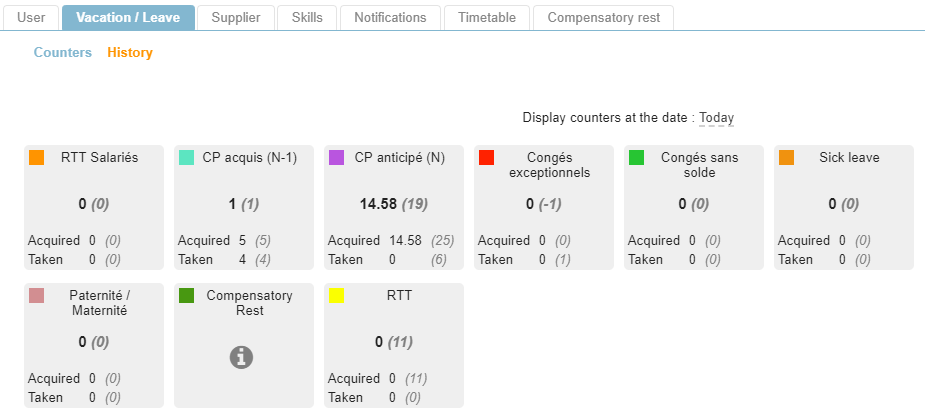
You can customize the existing types of leaves for all employees. To do so, click on the desired counter. The information is the same as described above for the general configuration.
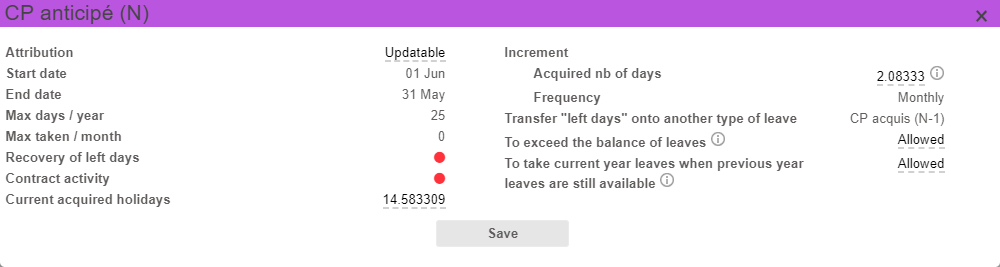
Calculation of the number of leave days
Calculation basis "workdays"
Only workdays (in most cases, from Monday to Friday) are taken into account for the calculation of the number of taken days of vacation days between the start date and the end date of the leave.
In this case, only 5 days are deducted per week, it is thus recommended to increment 2,08333 days/month.
Calculation basis "working days"
All working days (in most cases, from Monday to Saturday) are taken into account for the calculation of the number of taken days of vacation between the start date and the end date of the leave.
In this case, 6 days are deducted per week, and the vacation must thus be taken from Monday to Saturday. Therefore, it is recommended to increment 2,5 days/month.
Workdays and working days can be configured in the company's sheet: Configuration > Companies > Edit a company.
