-1.png?width=150&height=38&name=Logo_Original_Dark%20(2)-1.png)
How to attach a group of approvers to a particular step of the workflow
Configuration > Workflow > Workflows : you can attach one or several group(s) of approvers in the last column of the table listing the workflow steps. Once the  icon is displayed, you can define an approver.
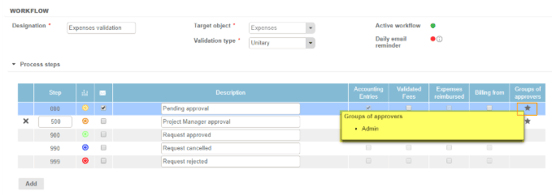
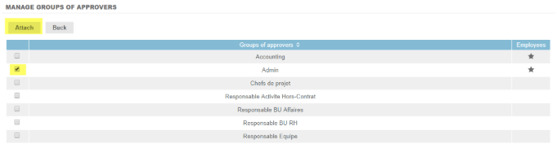
To select the group of approvers associated with the step, you have to click on the star icon. You will be redirected to the page dedicated to the management of groups of approvers: you have to check the box corresponding to the group of approvers desired, and then to click on the "Attach" button.
When hovering the cursor over the star icon, the names of the selected groups of approvers is displayed.
Validation rule within a group of approvers
The rule applying is a "OR". Each member of the group is informed of the request but the validation of one member only is enough to change the status of the request.
Validation rule between different groups of approvers
The rule is a "AND". If several groups are attached to one step of the workflow, each group of approvers must validate the request to change its status.
Validation rule for the Project Manager
Let's see what happens if the employee is assigned to several missions, with sereval project managers.
The Project Manager of EACH contract must validate the request to make it pass to the following status.
If there is one Project Manager per contract, each of them must validate the request.
If there is one contract but 2 Project Managers, only one of them must validate the request to make it pass to the following status.