-1.png?width=150&height=38&name=Logo_Original_Dark%20(2)-1.png)
Once the accounting integration setting for billing is activated, it is possible to define the PIVOT used for the "Product" type accounts.
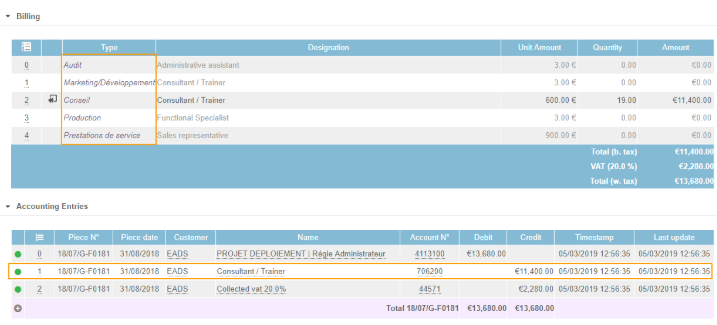
There are 4 types of PIVOT available:
PIVOT = Contract type
If the PIVOT = Contract type, at the time of invoice (change from Open Invoice to Saved Invoice (or Proforma Invoice if the setting is enabled), the Type registered on the invoice line will be the Contract Type (for billable service / production).
PIVOT = Type of Service
If the PIVOT = Type of service, at the time of invoice (change from Invoice open to Saved Invoice (or Proforma Invoice if the setting is enabled), the Type registered on the invoice line will be the Type of Service filled in on the object invoiced (assignment / deliverables).
If no Type of service is filled in or attached, the Contract type will be used by default.
Note: The types of services provided will influence the Pre-Billing on invoice proposals from:
- Subscription contracts WITH deliverables
- Flat-rate price contract with Billing planning = Deliverables
- Daily price contract = Contract & Down Payment
- Capped daily price contract with Billing Planning = Contract & Down Payment
- Sale with Billing planning = Contract & Down Payment
- Sale with Billing planning = Deliverables
- Internal activity
PIVOT = Contract category
If the PIVOT = Contract category, at the time of invoice (change from Open Invoice status to Saved Invoice (or Proforma Invoice if the setting is enabled), the Type entered on the invoice line will be the Contract Category entered on the Contract (for billable service / production).
If no Contract Category is filled in or attached, the Contract type will be used by default.
PIVOT = Type of service / Contract category
If the PIVOT = Type of service / Contract category, the system will first look for the Type of service associated with the sale. If left blank, the system will search for the Contract Category.
If no Type of service or Contract category is filled in, the Contract type will be used by default.