-1.png?width=150&height=38&name=Logo_Original_Dark%20(2)-1.png)
Definition
Whether the status of the contract is "open" or "launched", you will be able to assign it resources at any time.
The "Action" button allows you to assign employees on a contract and to define the settings of their assignment.
Guidelines
- Select an active employee: you can use filter to refine by profile, type, team or name.
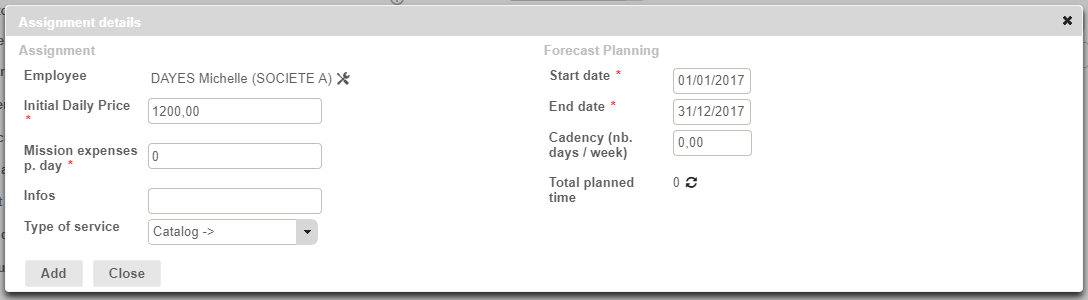
- The pop-up window "assignment details" includes:
- Initial Daily Price: by default, the amount depend on the configuration of the employee profile. However, you can modify it at any time.
- Mission expenses p. day: by default, you can specify a fixed amount per day. This amount will impact only initial and forecasted plannings.
- Infos: free text field
- Type of service: corresponds to the task assigned to the employee. You can configure the services catalog via the Configuration menu. You can also deactivate this option via the Settings menu.
- Start/End date: the employee will be able to enter activity only in the defined time slot. These dates are modifiable at any time.
- Cadency: Fitnet Manager create a planning based on the cadency. You have to enter a number of days per week or per months depending on the selected entry type. You can also configure a day-to-day planning.
Consequence on the contract
Once the employee assignment saved, a new section "Assignments" is created, with a "planning" tab.
Following the assignment of an employee:
- If the contract is on "open" status, Fitnet Manager creates an "Initial" planning.
- If the contract is launched, Fitnet Manager creates a "Forecasted" planning. 2 plannings are created beside: Initial & Completed (all two at zero).
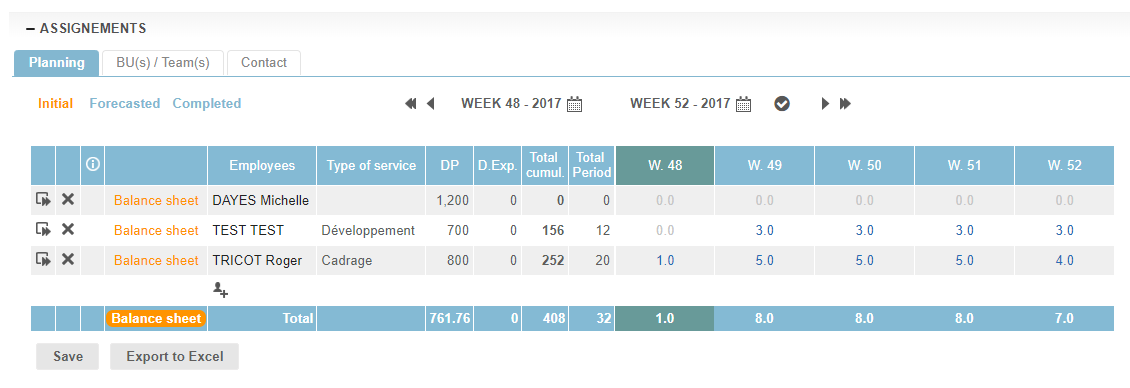
Reminder: planning employees is not mandatory; you can only assign them to the contract, which will allow time spent entry.