-1.png?width=150&height=38&name=Logo_Original_Dark%20(2)-1.png)
The VAT Amount (%) is broken down into a "Deductible VAT" type account. A "Deductible VAT" type account allows you to attach a VAT rate.
To set up this account, go to Configuration> Purchases > Accounts and create a "Deductible VAT" type account by clicking "Add", you can link the different VAT rates that you want to allocate to this account.
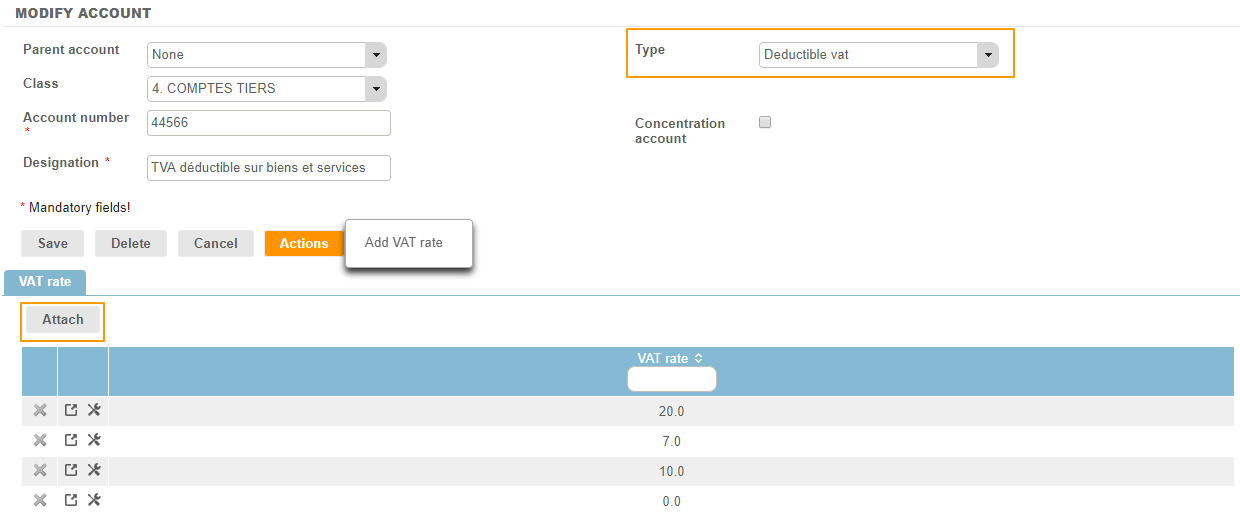
The account number associated with the deductible VAT amount will be filled in according to the VAT rate recorded on the Expense Category.
Note: a VAT rate can be attached only once.
Do not forget: if you create new VAT rates, attach them to an account.
Auxiliary account and Concentration account
You can define an auxiliary account and a concentration account. For more information, click here.