-1.png?width=150&height=38&name=Logo_Original_Dark%20(2)-1.png)
Basic Principles
Fitnet Manager allows you to manually reset acquired vacation counters, for each employee and for each type of leave. To do so, go to the Configuration > Activities > Vacation counters.
The management of vacation counters follows the accounting year. However, accounting periods may differ from one type of leave to the other, just as they may not follow the fiscal year: therefore, vesting periods are attached to the period of their year of beginning.
For example:
- Paid leaves available between June 2017 and May 2018 are attached to the 2017 period.
- "RTT" available between June 2018 and December 2018 are attached to the 2018 period.
- The "RTT" days-off which are attached to the 2017 period are the days avilable between January 2017 and December 2017.
When an employee is hired during the month, the acquired days of leave are calculated as a pro rata of the worked period.
For example:
- An employee is hired on the 06/15/18. The calculation of his acquired days of leave on the first month is done between the 06/15/18 and the 06/30/18, and not from the 06/01/2018.
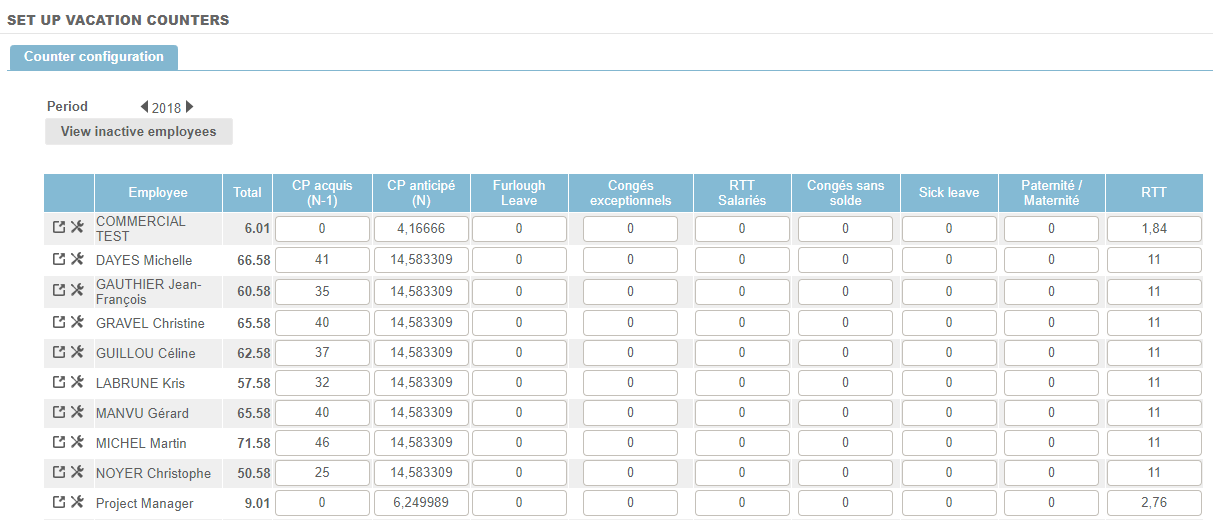
Initialize vacation counters
During the implementation, you have to fill in the leave balance for each type of leave created and for each employee. To do so, you have 2 options:
- Take the available days on the past month for each employee
Example: Paid leaves counter, from the 1st of June of 2017 to the 31st of May of 2018, 25 days/year, i.e. 2,08 days/month.
To initialize your counters at the 1st of February 2018, you just have to fill in the number of remaining days for each employee at the end of January, in the paid leaves counters. On the 1st of February, the system will automatically increment the 2,08 days you have previously configured for this type of leave, adding it to the counter.
- Take the acquired days on the period with a recovery of leaves on this period
Example: Paid leaves counter, from the 1st of June of 2017 to the 31st of May of 2018, 25 days/year, i.e. 2,08 days/month.
To initialize your counters at the 1st of February 2018, you can calculate the number of days cumulated by the employee since the beginning of the period (June 2017), i.e. 18,749 days. You can then fill in the past requests for leaves if you want to keep a history of requests (manually or via a data transfer).
Vacation counters and effective date of the employment contract
For a counter with incrementation: you can configure the acquired vacation counter from the first incrementation switchover following the effective date of the employment contract.