-1.png?width=150&height=38&name=Logo_Original_Dark%20(2)-1.png)
The leave counters are available from the Activities > Vacation/Leave module.

You can view your leave balance from both the "History of requests" tab and the "Calendar view" tab.
On the right side of the screen, you can view your available leaves counters.You will thus be able to check your leave balance on the date you want. The date that is displayed by default is the current date but you can modify it.
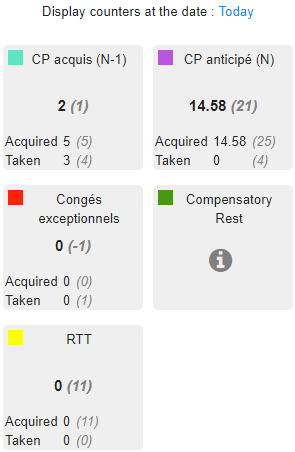
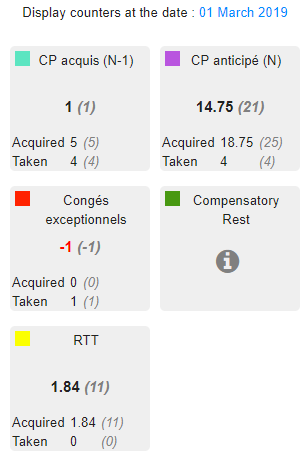
How to read leaves counters
- Days in bold: Earned days that you can take at the selected date.
- Days in bold in italics (in parentheses) : Earned days that you have to take before the end of the period.
- Acquired: number of acquired days at the selected date (in parentheses = on the period).
- Taken: number of days taken at the selected date (in parentheses = on the period).
Example for the counter "Advanced Leave Credits"
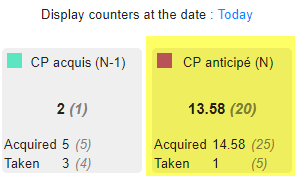
The period runs from June, the 1st, to May, the 31st. You display your counter at the current day's date:
- Days in bold: 13,58. You have 13,5 days left to take before the end of the period (May 31st). This number is calculated as follows: Number of acquired days at the current day's date - Number of days taken at the current day's date (14,58-1 = 13,58).
- Days in bold in italics (in parentheses): 20. At the end of the period, you will have 20 earned days to take until the 31st of May. It corresponds to the number of acquired days at the end of the period - the number of days taken until the end of the period (25-5 = 20).
- Acquired: 14,58. You have acquired 24,58 days between the beginning of the period and the current day's date.
- In parentheses: 25 > you have acquired 25 days of leaves until the end of the period.
- Taken: 1. You have taken 1 day of "CP anticipé (N)" until now.
- In parentheses: 5. You have taken 5 days in the whole period (meaning that you have taken days in the future).