-1.png?width=150&height=38&name=Logo_Original_Dark%20(2)-1.png)
EXPLORER OR TREE STRUCTURE TABLE
The explorer is automatically generated from data that exists on the ERP Fitnet Manager from the projects - Contracts - customers database.
The fields available are:
- Task Name: represented in a tree structure according to what has been defined in the Contract module. The item is displayed according to its type with the appropriate icon (project, contract, due date)
- Start date: Start date of the task.
- End Date: End date of the task.
- Duration of the task: calculated according to the start & end dates of the task
- Percentage of progress of the task: progress calculation depends on the items
- For Parent items: Progress is automatically calculated based on the progress of the children.
- For Child items:
- Milestone types: dates/instalments percentage is not taken into account.
- Type of assignment of an employee:
- If the employee has declared time on this assignment, the default is % of task = No. days worked / No. days forecast * 100
- If no time has been worked, the user can fill in the desired %.
- List of predecessors on the task: This is the list of the predecessors on the selected task displayed by Id.
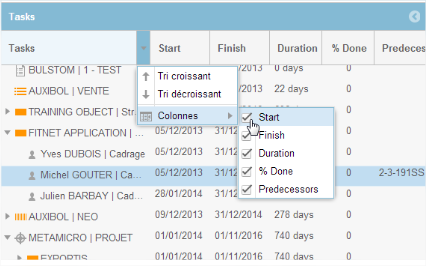
The display of certain fields can be disabled in the explorer.
TASK SCHEDULING
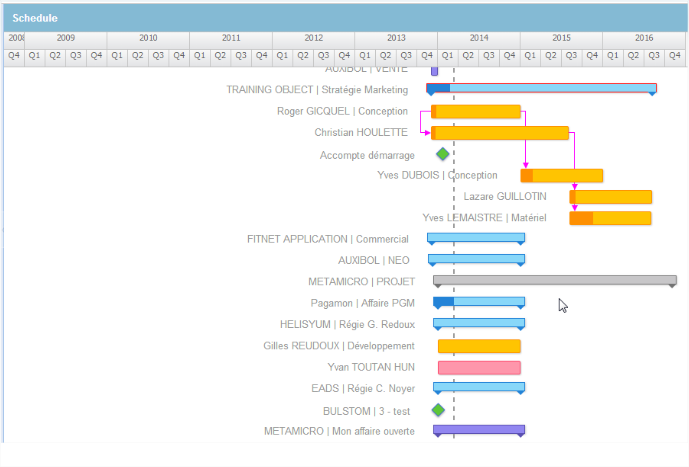
Graphic illustration of the different items are:
- Project = Grey
- Contract open = Purple
- Contract launched = Sky blue
- Assignment
- Employee = Yellow
- Sales = Pink
- Due date = Green
Warning: once activity is entered on an item, the part of the task with time on it gets darker. This is to distinguish the phases with and without days of work entered.