-1.png?width=150&height=38&name=Logo_Original_Dark%20(2)-1.png)
To create a furlough leave, you have to configure a new type of leave. To do so, go to the Configuration > Activities > Types of leave, and click on the "Add new absence type" button.
For more information about how to configure a type of leave, read the article Configuring types of leaves.
The most important data fields for a furlough leave are the following:
- Increment, acquired number of days and frequency: Number of acquired days for this type of leave per period (month or year)
- Furlough leave: must be activated
- Seniority X Month / X Year(s): Number of months or years following the employee's date of hire, date on which the counters begins to increment.
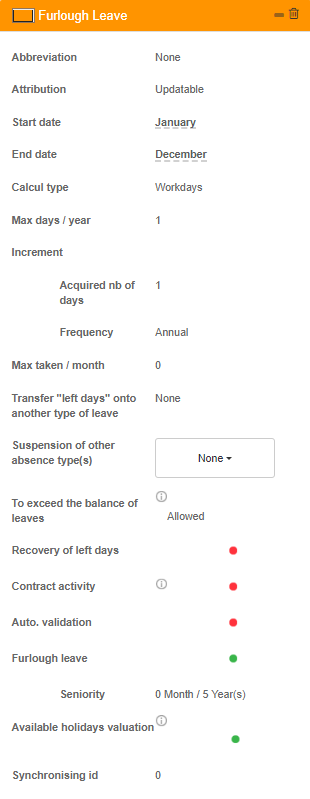
For example, on the configuration above, the employees working in the company for more than 5 years get 1 day of furlough leave per year.
Furlough leaves can be cumulated. For example, you can create 2 furlough leaves, one activated after 5 years of seniority and that gives the employee one day of leave per year, and another activated after 10 years of seniority with the same configuration. The result is as follows:
- Less than 5 years of seniority: 0 day of furlough leave / year
- Between 5 and 10 years of seniority: 1 day of furlough leave / year
- More than 10 years of seniority: 2 days of furlough leave / year
Initialization: Furlough leaves are initialized on the 1st day of the month following the signing of the employment contract. For example, if an employee has been hired on the 12th of February of 2017, he will obtain his first day of furlough leave on the 1st of March of 2022.