-1.png?width=150&height=38&name=Logo_Original_Dark%20(2)-1.png)
Fitnet Manager allows you to create a validation workflow for training sessions. To do so, you have to add a workflow for the target object "Training sessions" (Configuration > Workflow > Workflows > Add).
il suffit de créer un workflow ayant pour objet cible "Formations" (Configuration > > Créer) :
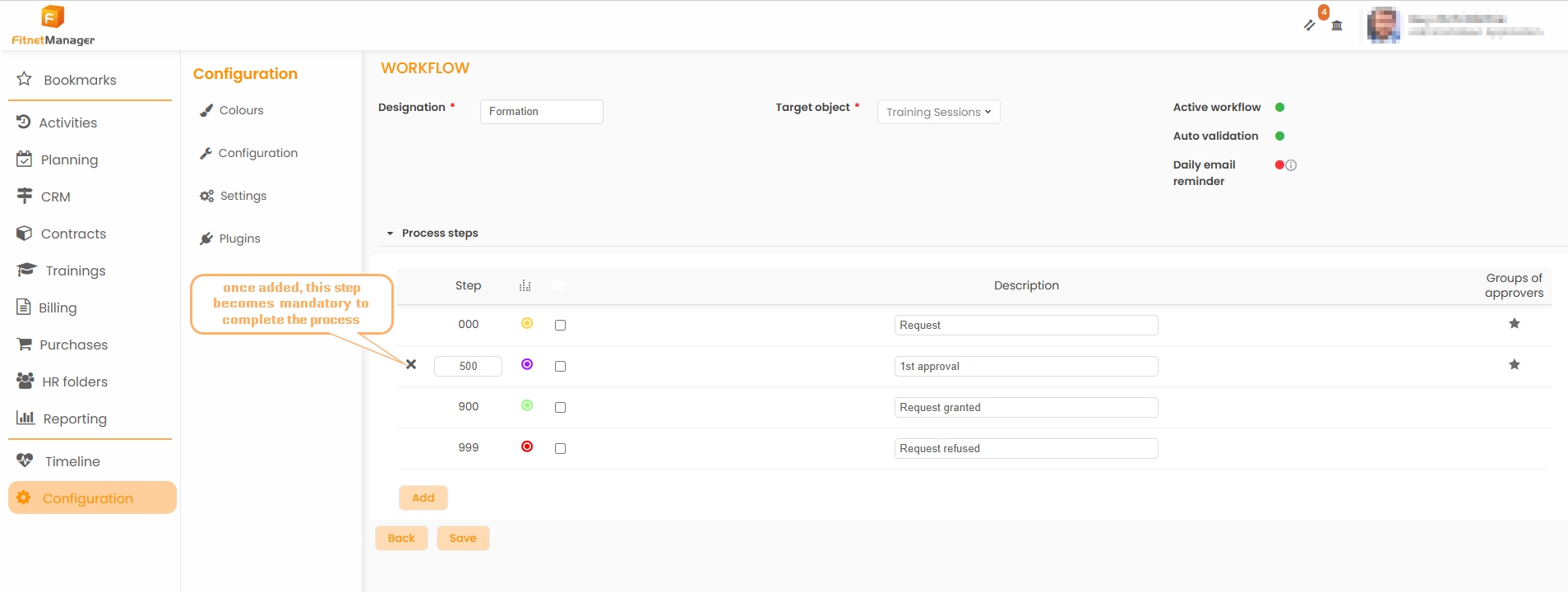
Steps
4 steps are required at a minimum:
- 1 step "submission" from 0 to 899: only one validation is required to process the request;
- 3 steps "validation" from 900 to 999 : the approver has 3 options to process the requests.
Return the training session request
In the situation where the training session request is returned at the 1st step of the workflow, it will get out of the workflow. The employee can thus edit and submit again his request.
In the situation where the training session request is returned at the last step of the workflow (or any intermediate step), it will return at the previous step of the workflow. The employee can't edit it.
Refuse and Cancel the training session request
When the approver clicks on the "Refuse" or "Cancel" button, the employee will view the request as refused or cancelled. He can't modify the request nor delete it. The approver can add a comment to explain the reason. For more information about it, go to the Workflow General Configuration section.