-1.png?width=150&height=38&name=Logo_Original_Dark%20(2)-1.png)
Activating the compensatory rest function in Fitnet Manager enables :
- Recovery of overtime
- Automatic calculation of compensation for hours to be recovered on a Type of absence.
- Configure time-off arrangements for each employee.
\!/ WARNING. The prerequisites for this to work are:
- The “Compensatory Rest” function can only be used if you perform a monthly closing (Configuration > Edit company > “Closed months” tab). This is because the Compensatory Rest calculation relies on the Monthly Closing function to block modifications to “compensated” Timesheets.
- Compensatory rest is only calculated for internal employees.
- Activities are entered in hours or days.
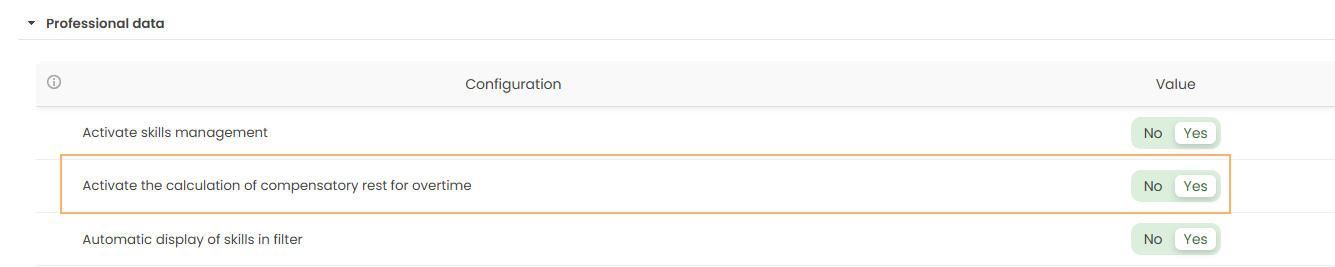
Compensatory rest is an optional function that can be activated and deactivated. Activation/deactivation is performed via the application's settings menu from an Administrator account:
Settings > HR Folders > Activate calculation of compensatory rest for overtime.
When this feature is activated, the system will automatically create a new type of leave in the Configuration (Configuration > Activities > Types of leaves). The Compensatory rest Type of leave is pre-configured but you can customize it. If you need help to configure this type of leave, please read this article.
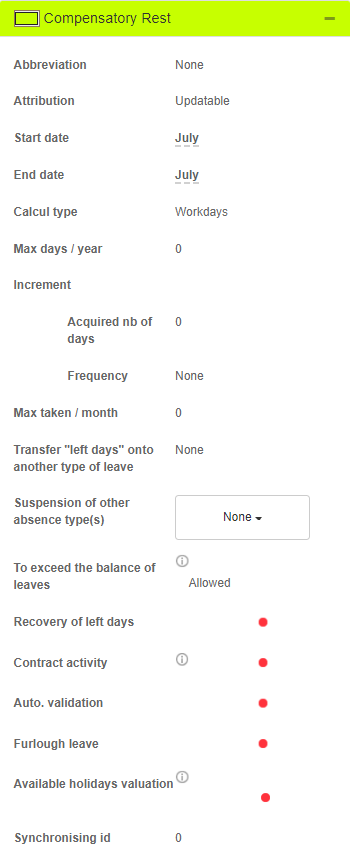
This type of leave will calculate the number of recoverable days based on the employee's overtime.
You must then configure schedules of increases for the compensatory rest's calculation. If you need help to do so, please read our article on the subject.
The compensatory rest will then be available for the employees of your company.